
Verify Changes to URL Discovery in LLMIC
Repeat the discovery mechanism that changed and verify the intended relationship.
A developer adds a missing link, and the destination appears in a direct URL check. Is the discovery problem fixed? Not yet. The direct check supplied the address itself, so it bypassed the link that changed.
Verify changes to URL discovery in LLMIC by repeating the mechanism that originally failed. A navigation repair needs a linked-route test. A sitemap repair needs a fresh inventory check. A corrected input list needs a comparison of the supplied addresses. Match the acceptance test to the actual change before declaring the work complete.
Turn the Repair Into an Observable Requirement
Write the expected relationship in a sentence. For navigation, name the source and destination. For a sitemap, name the inventory and the address that should appear or disappear. For an input correction, identify the original error and the intended replacement.
Include what must remain true. A new category link should not remove other required links. A sitemap correction should not unintentionally omit neighboring public pages. These control cases make a regression visible even when the original missing destination now appears.
Keep indexing and ranking outcomes outside this acceptance test. The test can establish that a published relationship is present and usable under the recorded conditions. It cannot establish that Google has processed the change or chosen the page for indexing.
Keep a Before Record That Shows the Failure
Save the original crawl and the relevant source evidence. Record the input mode, seed, settings, time and first failing step. If the original problem was only suspected, label it suspected; a later successful test does not retroactively prove the original cause.
Ask the implementation owner for the deployment time and the exact source changed. A content edit, a template change and a sitemap-generator adjustment have different potential reach. Knowing what changed helps you choose representative control cases for the retest.
If no reliable before evidence exists, verify the current requirement and state that a historical comparison is unavailable. Do not manufacture a before-and-after story from memory or an undated screenshot.
Select the Test That Can Falsify the Repair
| Change made | Fresh test | A result that is insufficient on its own |
|---|---|---|
| Internal link added or corrected | Repeat the linked route from the agreed seed and inspect the destination | Pasting the destination into URL List |
| Sitemap entry added | Retrieve the named sitemap again and confirm the exact entry | Seeing the page in a navigation crawl |
| Stale sitemap entry removed | Compare fresh inventory membership with the removal requirement | A successful redirect from the old address |
| Input list corrected | Compare old and new input files, then inspect the intended addresses | A larger total without URL reconciliation |
| JavaScript navigation changed | Inspect the source under the agreed rendering conditions and repeat discovery | A screenshot showing the interface after manual interaction |
A useful test has a possible failure result. If the test would pass even when the changed link is removed again, it is not testing that link. This simple question helps teams avoid accepting repairs with evidence from the wrong mechanism.
Repeat the Route Under Comparable Conditions
For a linked test, use the original starting point and comparable scope settings. Preserve the rendering and access choices unless changing them is explicitly part of the requirement. Confirm that the source page was observed before interpreting the destination’s presence or absence.
When a destination can be introduced by more than one route, inspect the repaired source relationship directly as well. Its appearance somewhere in the result set may have come through a different link. The acceptance claim should be about the route you changed, not merely about membership in a larger set.
For sitemap work, preserve the fresh sitemap content or URL inventory with its retrieval time. Confirm that you are checking the intended sitemap, especially when the website has multiple sitemap files. Compare exact addresses and retain any relevant redirect differences separately.
Inspect the Destination and the Control Cases
Finding an address is only part of a useful navigation test. Check that it leads to the intended page content. An incorrect redirect or a different product page can satisfy a superficial “URL was found” condition while failing the reader’s task.
Inspect representative unchanged links near the edited element. If the repair changed a shared template, include examples from other affected sections. Define the sample explicitly rather than treating a few successful observations as proof that every instance works.
Check for unintended expansion as well. A repaired navigation component may expose parameter combinations or duplicate routes that were not part of the intended inventory. Record unexpected URL families for review instead of counting all additions as improvements.
Worked Example: Verify a Tutorial Hub Repair
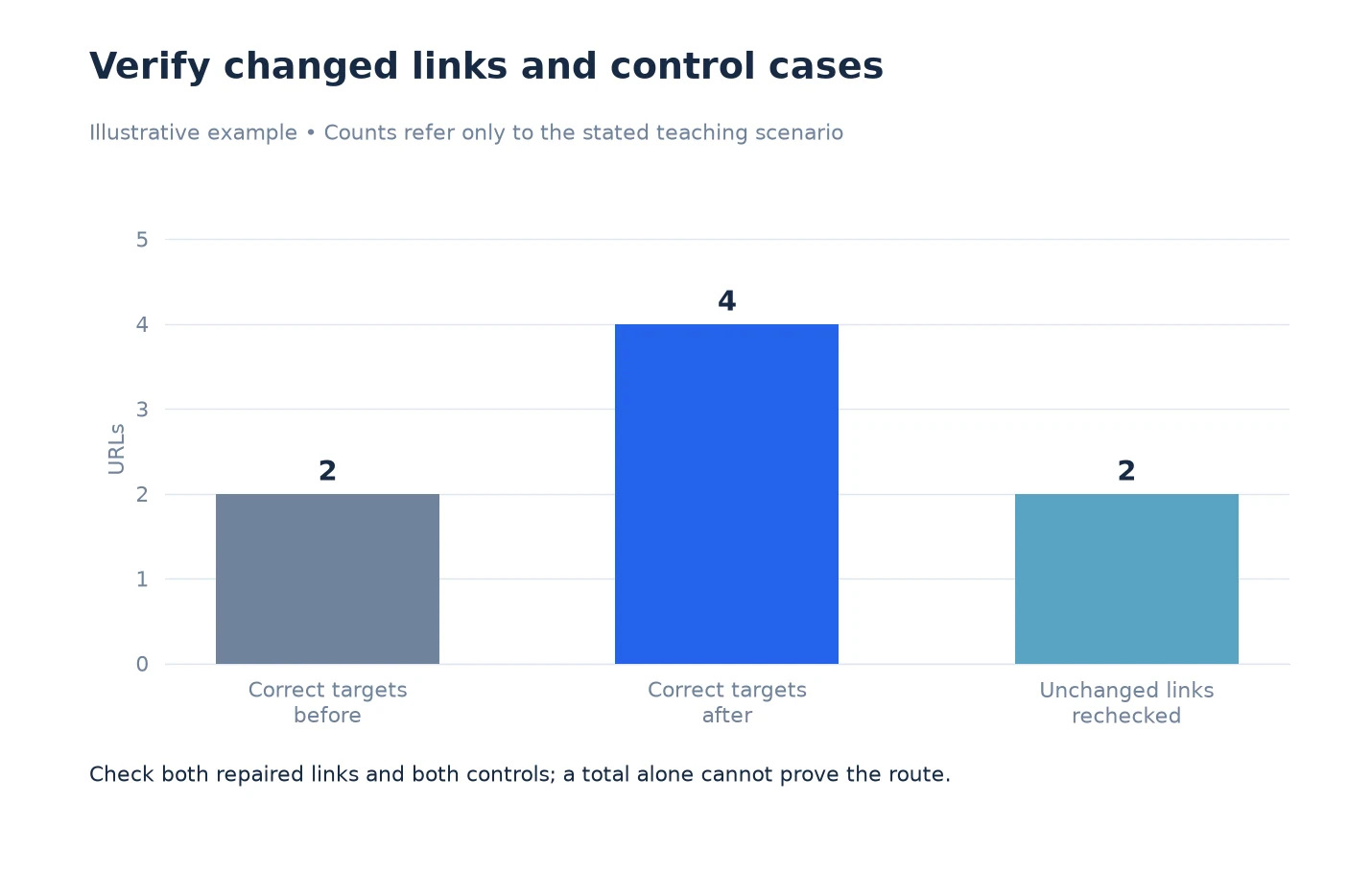
This is an illustrative example. A tutorial hub should link to four newly published lessons. Before the change, two card destinations point to old paths. The implementation owner corrects those two href values and leaves the other two cards unchanged.
The reviewer saves the original evidence, then repeats the linked route from the hub after deployment. The reviewer also inspects the two corrected relationships on the source page, because the lessons could be discovered elsewhere on the site. Both corrected links lead to the intended lesson content.
The two unchanged cards serve as control cases and still lead to their expected pages. The reviewer records four checked relationships, identifies the two that changed and attaches the fresh observations. The conclusion is that the named hub repair passed this acceptance test, not that all navigation across the domain is perfect.
If one corrected link had led through an unexpected replacement page, that case would remain open even if the final crawl contained four lesson URLs. The acceptance condition concerns the intended relationship and destination, not just the total.
Record Passed, Failed and Unestablished Separately
Use passed when the evidence satisfies the stated condition. Use failed when the observed result contradicts it. Use not established when a request failed, a run stopped too early or the necessary source evidence was not collected.
For each unresolved case, name the next observation needed. That might be a fresh sitemap retrieval, a completed linked run or an inspection of the rendered source. Avoid repeatedly changing the website when the actual gap is missing verification evidence.
Keep implementation status separate from verification status. “Deployed” records an action; “verified” records the result of a test. Both belong in the working sheet, along with their dates, so a future reviewer can reconstruct what happened.
Close the Loop With the Original Discovery Review
Update the membership sheet using the new evidence, retaining the before values rather than overwriting them. Explain why each classification changed. If a sitemap-only page is now observed through the intended link, preserve the source relationship that supports the new classification.
Use Export URL Discovery Evidence From LLMIC to package the acceptance record. If the fresh result contradicts the diagnosis, return to Troubleshoot URL Discovery in LLMIC and investigate the first failing step instead of broadening the success claim.
Questions About Discovery Acceptance
Why is a direct URL check insufficient for a link repair?
It introduces the destination without using the repaired link. Repeat the linked route and inspect the source relationship to establish that the changed mechanism works.
What if the page can be discovered through another route?
Inspect the repaired link directly and preserve its source and destination. Membership in a large crawl does not identify which route introduced the page unless that relationship is separately established.
How should I verify a sitemap removal?
Retrieve the intended sitemap again and compare exact membership with the approved removal. A working redirect from the old URL does not show that the sitemap entry was removed.
Do I need a full-site crawl after every navigation edit?
Choose a test proportionate to the change. A single-link edit can begin with its source and destination; a shared template change needs representative affected sections and control cases. State the tested population.
Can I close a case when the developer says it is deployed?
Record deployment, then verify the acceptance condition. The implementation note does not replace evidence that the published route or inventory behaves as intended.
What if the retest fails because of a temporary request problem?
Mark the condition not established when usable evidence is missing. Investigate the request outcome and repeat the appropriate test when possible; do not count an unavailable observation as a pass.
Does a passed discovery test promise better search visibility?
No. It confirms the named local requirement under the recorded conditions. Search engines make separate crawling, indexing and ranking decisions that need their own evidence.
Sources, Statistics and Measurement Notes
The four-lesson hub is an illustrative acceptance test, not a customer performance claim. The comparison sheet and acceptance states are analyst records. LLMIC input modes and crawl-file controls were reviewed on 5 October 2026.
Google’s link best practices, accessed 5 October 2026, provides background on usable link destinations. The test described here checks the repaired relationship locally and makes no claim about when Google will process it.