
Export Crawl Scheduling Evidence From LLMIC
Preserve configuration, run chronology and page evidence as separate layers.
A spreadsheet of findings does not, by itself, explain whether a recurring audit ran as intended. The recipient also needs the schedule identity, actual observation window, job outcome and crawl scope. Export crawl scheduling evidence from LLMIC as a small evidence package rather than assuming that a page-results export contains every scheduling field. Preserve the saved crawl when available, export the relevant page rows and attach a clearly labelled manual run log. Keep actual recorded events separate from the times somebody hoped the scheduler would execute.
Decide What the Recipient Must Verify
Begin with the handoff question. A colleague investigating a missing run needs a chronology and the state messages. An editor repairing a website issue needs affected URLs and their findings. A reviewer accepting a scheduling change needs comparable recurring executions before and after the intervention. Sending every available row without identifying the question can bury the evidence that matters and expose unrelated information from the crawl.
Write a one-sentence acceptance condition at the top of the package. For example, the recipient should be able to identify the changed schedule, the actual later run and the expected URLs that were inspected. Make clear whether the package documents a working observation, a partial result or an unresolved gap. A well-labelled failed example can be useful evidence; it should not be hidden simply because it prevents the report from looking complete.
Keep Three Evidence Layers Separate
The schedule configuration explains intended recurring work. The run record explains what the scheduler reported about an attempt. The saved crawl and exported page rows explain what the application observed about the website. These layers connect, but they are not interchangeable. A schedule’s existence cannot substitute for a completed run. A completed run message cannot substitute for page-level evidence of the finding under review.
Use separate files or clearly separated sections. Preserve the unchanged source export and make annotations in a working copy. If you manually transcribe a run message, identify it as a transcription with its observation time. Do not label manually assembled columns as a native LLMIC scheduling export unless that specific export exists and has been verified in your installed release. This guide does not assume an automatic all-in-one schedule-history export.
| Package element | What it establishes | Important limit |
|---|---|---|
| Configuration note | Target, type and intended interval | Not proof of execution |
| Run log | Observed state and actual timestamps | Transcription must be labelled |
| Saved crawl | Retained website observations | Coverage may be limited |
| Page-row export | Reviewable selected findings | Filters may exclude relevant rows |
| Review note | Interpretation and next action | Human conclusion, not raw measurement |
Record Actual Times With Their Meaning
Give each timestamp a name and a timezone. Expected opportunity, actual start, actual finish, export creation and review time are different events. A file’s modification date is not a reliable replacement for the observation window. A copied or regenerated export can have a recent file date while containing older website evidence. Retain the collection time in the handoff so the recipient does not mistake a fresh file for a fresh crawl.
Where a field is unavailable, leave it unavailable and explain why. Do not estimate a missing start time by subtracting an assumed duration from the finish. Do not fill an unobserved window with zero issues to make a chart continuous. These shortcuts create a precise-looking record that cannot be defended. A timeline with an explicit unknown is more useful than a complete series assembled from unsupported assumptions.
Preserve Scope and Selection
Record the intended input and the actual collected URLs. Include the relevant crawl mode, boundary, rendering choices and filters needed to understand the result. If the export shows only failed pages, label it as a failed-page subset rather than the whole audit. If the result contains an unexpected redirect or missing input, include that exception in the reconciliation rather than silently dropping it from the report.
Before sharing, compare the exported rows with the intended on-screen selection. Confirm that column headings, URL values and finding counts match the evidence you meant to hand off. Sorting and filtering are useful for review, but they can change which rows a recipient sees. Keep enough context to reproduce the subset, and retain the original full evidence locally when appropriate. Do not claim full coverage from a small selected export.
Worked Example: A Four-File Handoff
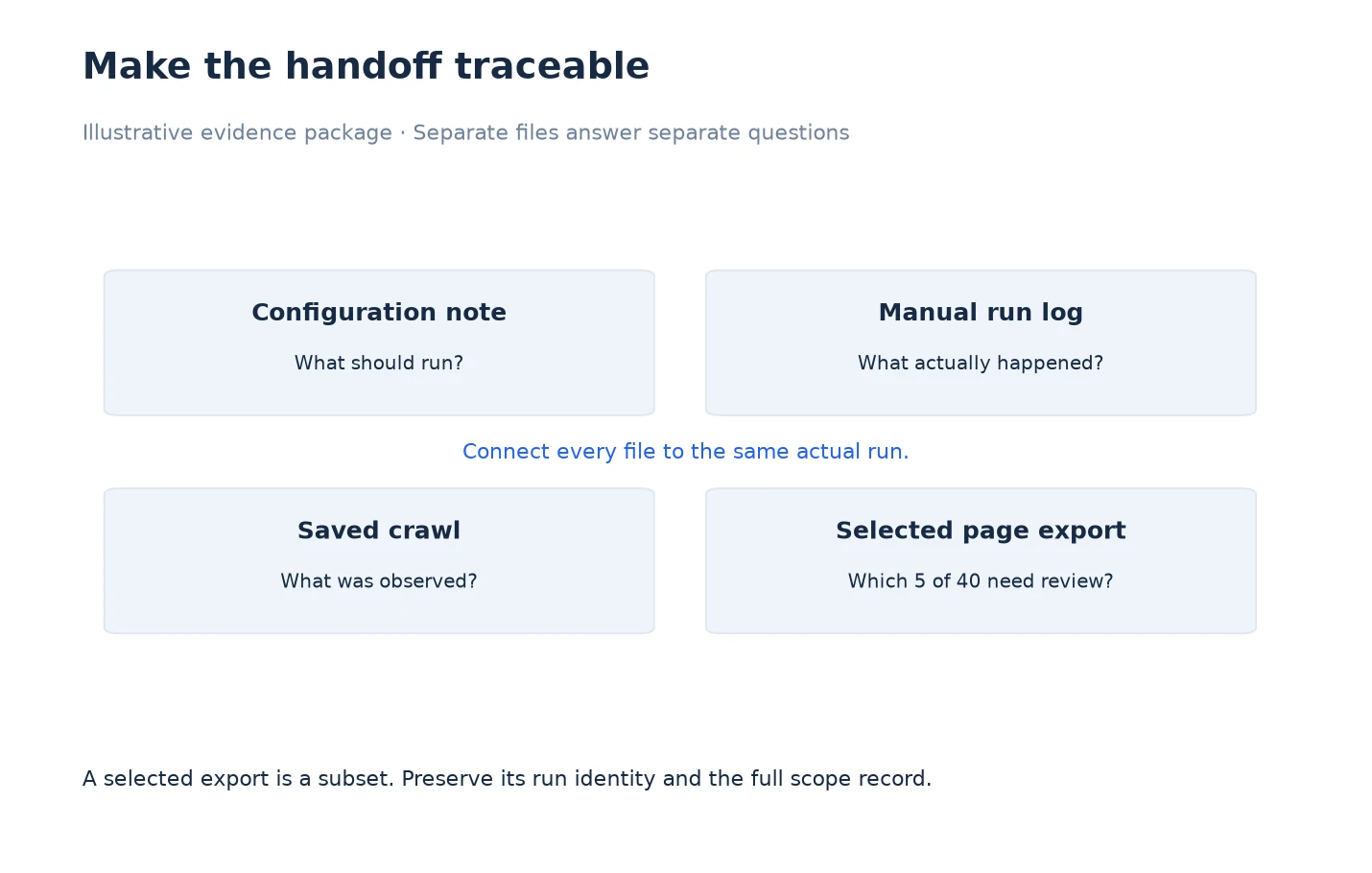
Consider an illustrative investigation in which a recurring run was deferred at its expected opportunity and later completed after connectivity returned. The package contains a configuration note, a manually recorded chronology, the saved crawl and a selected page export. The chronology identifies the expected opportunity, the observed deferral message, the actual start and the actual finish. It also identifies who recorded the message and when the export was created.
The selected export contains five pages needing review from a forty-page observed set. The cover note says five selected pages, forty observed pages and the separately recorded intended input. It does not call the five rows the entire audit. If the recipient wants to validate a missing URL, the operator can consult the retained input inventory and saved result. The diagram shows the relationship between files; its boxes do not represent an automated export pipeline or measured processing duration.
Protect the Evidence While Sharing It
Inspect URLs and notes for credentials, private query parameters and unrelated client information. Make a redacted sharing copy when needed and retain a note describing what was removed. Redaction should not silently change the conclusion: if removing a private path prevents the recipient from identifying the affected page, provide a safe stable reference or explain the limitation. Keep the untouched original under the appropriate account and storage controls.
Choose a sharing method suitable for the recipient and the data. A public marketing example should not contain a private production crawl merely because it makes the screenshot more convincing. For a support request, include the smallest reproducible evidence package that answers the question. Make the purpose of every file clear in its name or cover note. The recipient should not need to guess which export is current or which run it describes.
Close the Handoff With a Reproducible Conclusion
State what the evidence supports, what remains unknown and what should happen next. A useful conclusion might say that the later recurring run completed, that the expected URLs were reconciled, and that the earlier offline window remains unobserved. It should not claim uninterrupted monitoring or website uptime across that gap. Ask the reviewer to validate the same acceptance condition instead of judging the package by its size.
Use Review Crawl Scheduling Results in LLMIC for interpreting the recorded states and Verify Changes to Crawl Scheduling in LLMIC when the package accompanies a process change. Keep the handoff connected to its original evidence so a later disagreement can be resolved by inspecting records rather than reconstructing them from memory.
Questions About Scheduling Exports
Is there a single native export containing every scheduling field?
Do not assume one. This workflow combines available crawl exports with an explicitly manual configuration and run log. Confirm the export capabilities of your installed release before naming a file as a native scheduling-history export.
Can I use the export file’s date as the audit time?
No. A file can be copied or created after collection. Record the actual observation window separately so the recipient knows when the website evidence was gathered.
Should I include expected runs that never produced results?
Include them in the chronology as unobserved opportunities with the available explanation. Do not create empty audit rows that imply the website was checked and had no issues.
How should I label a filtered page export?
State its selection rule and row count, alongside the observed crawl scope and intended input. A subset should remain visibly distinct from the full evidence population.
Can I add notes to the exported CSV?
Use a working copy or separate review sheet, and preserve the unchanged source export. Clearly distinguish added interpretation from original observed fields so another reviewer can trace each claim.
What if a timestamp is unavailable?
Mark the field unavailable and explain its significance. Do not invent it from neighboring timestamps or assumed durations. The missing value may limit the comparison but should not be concealed.
What makes the handoff complete?
The recipient can identify the schedule, actual run, collected scope, relevant findings and acceptance condition, while seeing any missing evidence. A large attachment alone does not establish those relationships.
Sources, Statistics and Measurement Notes
Reviewed on 5 October 2026 against schedule configuration and run-record fields, saved crawl handling and page-result export workflows. Manual log fields are recommendations for evidence preservation, not claims about an automatic export feature.
The forty-page and five-row example is illustrative. It is not customer data or a completion benchmark. See export crawl scope evidence for related subset and input-reconciliation rules.