
Verify Changes to Crawl Scope in LLMIC
Compare named URLs before and after a deliberate scope change.
Yesterday’s crawl contained 300 URLs. Today’s contains 420. That difference may mean a scope change worked, but it may also mean the input changed, more parameter variations were discovered, or a previously excluded area entered the run. A larger total is not an acceptance test.
Verify changes to crawl scope in LLMIC by comparing a defined baseline with a controlled rerun. Decide which URLs should appear, which should remain outside the investigation, and which observations must stay comparable. The result should explain what changed and whether that change answered the original problem.
Define Success Before Starting the Rerun
Write one testable statement. For example: “The six help articles previously beyond the traversal boundary should now be observed from the same starting hub.” That is clearer than “improve crawl coverage.” It names both the affected URLs and the route that must work.
Add a negative check when the boundary matters. If the investigation is meant to remain within a documentation area, choose representative URLs from an unrelated area that should not become part of the accepted evidence set. A scope expansion can solve one omission while making the overall investigation less useful.
Separate configuration success from website success. Raising a limit may let the crawler inspect more pages; it does not repair the content on those pages. A newly observed URL still needs the checks relevant to the actual release or audit.
Protect the Baseline and Record the Intended Change
Save the existing crawl before replacing the active results. Keep the original input list or starting URL, run time, settings and unresolved URL set. If the baseline was partial, record that fact rather than presenting it as a completed reference run.
State the exact change: a different depth, a corrected input list, a new starting URL, or a repaired internal link. Prefer one change at a time when you are diagnosing cause. If the website and several settings changed together, the retest can verify the new state but may not identify which individual change produced it.
Do not reconstruct a baseline from memory when reliable records are missing. Start a new documented baseline and say that historical comparison is unavailable. You can still test the current requirement without inventing a before state.
Repeat the Relevant Conditions
Use the same input mode unless changing it is explicitly the subject of the test. Keep access, user-agent and rendering choices comparable. Record the elapsed time between runs because a changing website can introduce differences unrelated to your configuration.
For a linked-discovery repair, repeat the linked route. A successful direct URL List check is a useful preliminary test, but it does not prove that Auto-Crawl can now discover the page through the intended navigation. For an input-list correction, preserve the old and new lists so their differences remain visible.
Wait for the intended run to finish, or explicitly mark it partial if it stops. Check whether a new page ceiling was reached. A larger ceiling that is also exhausted may leave the same completeness question unresolved at a different number.
Compare URL Membership Before Comparing Issue Totals
Build a comparison using URL identities. Keep original and redirected destination URLs distinct where both are relevant. Group the evidence into URLs present in both runs, newly observed URLs, URLs no longer observed, and URLs still unresolved.
| Comparison group | Question to answer | Acceptance implication |
|---|---|---|
| Present before and after | Did the same checks still produce usable evidence? | Supports continuity of the baseline population |
| Newly observed | Were these the intended additions? | Supports the scope change only when membership matches the plan |
| No longer observed | Was removal intentional or a regression? | Requires explanation before closing the test |
| Still unresolved | Is the original omission or failure still present? | Keeps the relevant acceptance condition open |
Only after membership is understood should you compare issue counts. A drop in issues can result from omitting affected URLs. An increase can result from inspecting more pages. Neither total alone establishes that the site improved or worsened.
Worked Example: Extend a Help-Center Crawl
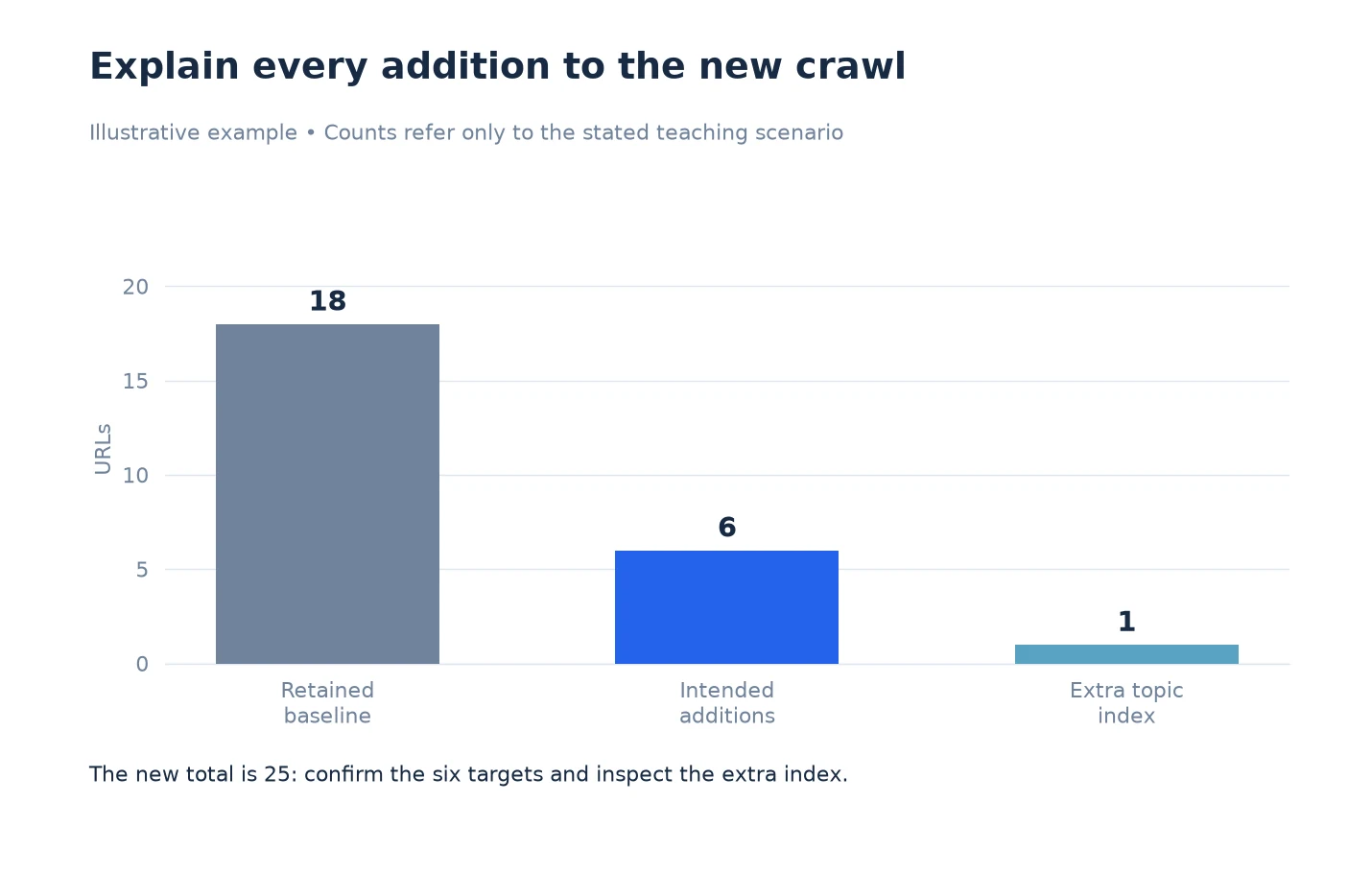
The following is an illustrative test, not a customer result. A baseline contains eighteen help-center URLs. Six known articles remain beyond the chosen traversal boundary. The team keeps the same starting hub and changes the depth setting for the rerun.
The rerun records twenty-five URLs. All eighteen baseline URLs remain, all six target articles appear, and one additional URL is newly observed. The team inspects that extra URL before declaring success. It turns out to be a legitimate topic index on the route to the articles, so the scope note includes it explicitly.
The membership test passes for the six intended additions. The team still reviews their page evidence because being present in the crawl does not mean their content or links passed every check. It also records that the conclusion applies to this help-center route, not to every URL on the domain.
If two baseline URLs had disappeared instead, the team would investigate those losses before closing the change. A total of twenty-five would not compensate for missing required baseline pages. The acceptance decision rests on named URLs and expected behavior, not arithmetic alone.
Investigate Differences That Do Not Fit the Hypothesis
When a new URL family appears unexpectedly, inspect representative examples. Determine whether the cause is an intended discovery path, a redirect, a parameter variation or an unrelated site change. Avoid raising another limit until you understand why the set expanded.
When an unchanged URL stops producing usable evidence, compare the request outcome and observed content. Access restrictions, transient failures or a changed destination can affect the comparison. Record unresolved cases rather than silently dropping them from the denominator.
If several settings changed at once and the result is ambiguous, use a small follow-up test that isolates the most plausible cause. Preserve both broader runs. A focused diagnostic check can clarify the difference without replacing the evidence you are trying to explain.
Write the Acceptance Record
Record the baseline and rerun identifiers, intended change, expected URL additions or removals, actual comparison and unresolved cases. Give each acceptance condition a result such as passed, failed or not established. “Not established” is appropriate when evidence is missing; it is not a synonym for passed.
Name the person or team responsible for unresolved cases and the next observation needed. Keep the evidence files alongside the decision. This makes the review useful when the next release changes navigation again or a colleague asks why the crawl configuration differs from the previous one.
For a repeatable setup, return to Configure Crawl Scope in LLMIC. For an implementation handoff, use Export Crawl Scope Evidence From LLMIC to package the before and after records without overwriting either.
Questions About Retesting Scope Changes
Is a higher URL count proof that the change worked?
No. Verify that the intended URLs were added and required baseline URLs remain. Inspect unexpected additions before treating the larger set as useful coverage.
Can I change rendering and depth in the same test?
You can test the combined configuration, but the result will not isolate which change caused a difference. For diagnosis, change one relevant condition at a time where practical.
Should I compare issue counts across different URL populations?
Only with the population difference made explicit. Prefer a like-for-like comparison for URLs observed in both runs, then report newly observed pages separately. Otherwise the totals can be misleading.
Does a direct URL check verify an internal-link repair?
It verifies direct access under that test’s conditions. To verify discovery through the repaired link, repeat the original linked route and confirm the destination is observed.
What if the baseline crawl was incomplete?
Preserve that limitation. You can compare recorded observations, but you cannot treat unobserved baseline URLs as confirmed absences from the website. Define a fresh complete test set where needed.
How should I handle URLs that disappear after the change?
Separate intentional removals from unexplained losses. Check the input, access and recorded evidence for each required missing URL before accepting the new scope.
Does successful scope verification establish Google indexing?
No. It establishes the result of the local crawl test. Google’s crawl and indexing observations need their own evidence and dates; do not combine them into a single unqualified pass status.
Sources, Statistics and Measurement Notes
This verification procedure uses LLMIC’s recorded crawl evidence, input modes and settings reviewed on 5 October 2026. The comparison table is an analyst method; it is not a promise that the application automatically certifies every acceptance condition.
The eighteen, six and twenty-five URL counts form one illustrative example. They are not measured customer outcomes or expected performance. No ranking, indexing or traffic improvement is inferred from a successful scope retest.