
Configure Robots Directives in LLMIC
Prepare a reproducible robots policy review.
Before changing a robots setting, decide which question you are answering. Do you want LLMIC to respect the site’s crawl rules, inspect a proposed robots.txt file, or investigate a page’s indexing instructions? Those tasks use different evidence. Treating them as one switch can produce a convincing report about the wrong thing.
This guide prepares a small, repeatable robots review in LLMIC. It distinguishes the local crawler setting from the Robots.txt workspace and from directives returned by individual pages. The goal is a configuration record that another reviewer can reproduce, with an explicit boundary between a local simulation and a live website observation.
Choose the Evidence Before the Controls
Start with one website origin, one user agent and a short list of representative URLs. Record the scheme and hostname exactly. A rule fetched from one host is not evidence for another host, even when both display the same brand or redirect visitors to the same homepage. Include a normal public page and a path where access is intentionally restricted.
Write down the intended outcome for each test URL. A public help article might be intended for discovery, while an internal search page may have a different indexing policy. These intentions are inputs from the site owner, not conclusions that LLMIC can infer reliably from a URL name. Resolve an unclear policy before interpreting an alert as a defect.
| Question | Relevant LLMIC evidence | What it cannot establish alone |
|---|---|---|
| Will this audit respect crawl restrictions? | Crawl settings and actual run outcome | What another crawler fetched |
| How does the local parser interpret these rules? | Robots.txt source and User-Agent Simulation | Provider-specific behavior in every edge case |
| What did this page return? | Saved page data, meta robots and response-header evidence | Whether Google indexed the page |
| Did a proposed edit reach production? | Newly fetched live source after deployment | Deployment success from a pasted draft |
Set the Local Crawl Policy
In crawl settings, inspect the Respect robots.txt control before collecting the baseline. Record its value alongside the selected user agent and crawl scope. For a normal website review, leave respect for robots rules enabled. If the run skips a URL because of a matching rule, preserve that result rather than treating the missing page content as an empty document.
The setting controls LLMIC’s collection behavior. It does not edit the site’s robots.txt file or change any search engine’s configuration. An authorized diagnostic crawl with different settings is a separate experiment; label it clearly and do not silently mix its page observations into a baseline collected under the original policy.
Keep speed settings separate from access rules. LLMIC exposes Respect robots Crawl-delay as another control. A delay concerns request pacing; it does not turn a disallowed path into an allowed one. For performance investigation, use the crawl speed configuration guide and preserve the robots policy while comparing runs.
Fetch a File or Label a Draft
Open the Robots.txt workspace and inspect the URL field before choosing Fetch. LLMIC can infer a robots URL from the current context, but that convenience is not a substitute for checking the intended origin. Read any fetch error. A failed retrieval is not a successful observation of a file with no restrictions.
The workspace also accepts editable source. This is useful for reviewing a proposal, but it creates two possible evidence states: fetched live content and locally edited content. Add a note identifying which state you are testing. Once you type into the editor or append a policy preset, the displayed rules must not be described as deployed merely because the simulator updates.
Review Groups, User Agents, Sitemaps and Warnings as navigation aids. A count tells you where to inspect; it does not certify the policy. Read the actual source and warning text. Preserve the original file separately before experimenting so you can distinguish a proposed change from an accidental deletion or a formatting difference.
Test a Path, Not Just the Homepage
Enter the intended agent token and exact path in User-Agent Simulation. Record the returned Allowed or Blocked result together with its explanation. Repeat for neighboring paths where the same change could have an unwanted effect. A useful small test set includes the intended exception, the broader restricted directory and an unrelated public page.
The AI Crawler Access cards in the reviewed application evaluate the root path, /. Their status is therefore a root-path summary, not a complete policy assessment for every article, asset or private directory. Use the path simulator to investigate a specific location. Neither view proves that a provider visited the URL or used it in an answer.
The simulator is a local parser. Complex combinations of repeated groups, agent matching or unusual syntax deserve a check against the relevant provider’s specification and actual observations. Keep the source and explanation when a result surprises you; do not rewrite a production policy solely to make a single badge change color.
Worked Example: Three Paths, Two Policy Intentions
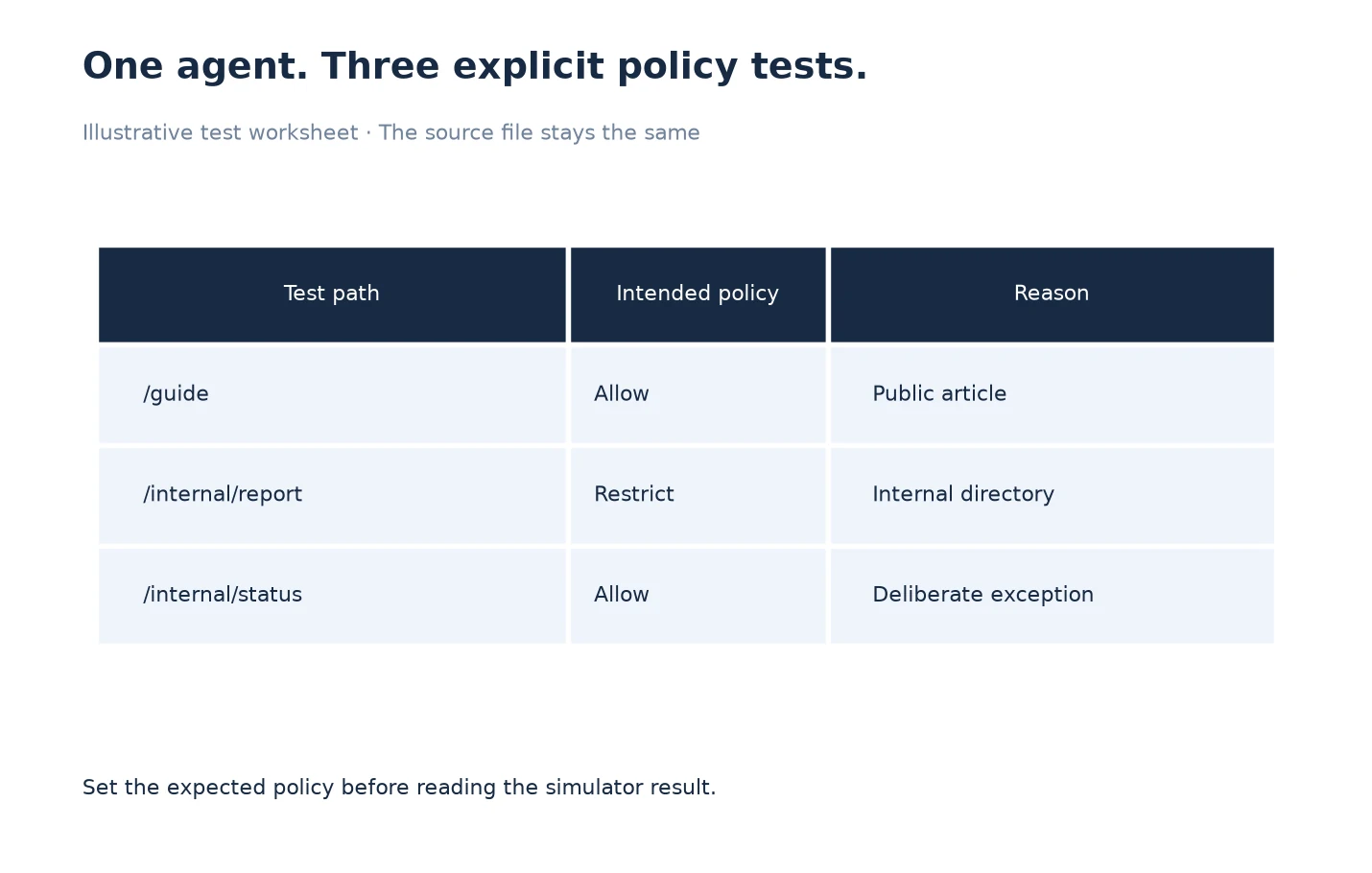
Consider an illustrative documentation site. Its owner wants a public guide available, an internal directory restricted, and one public status page reviewed as a deliberate exception. The test worksheet has three rows: /guide, /internal/report and /internal/status. All three use the same chosen agent and the same saved rules file.
First record the expected decision for each row. Then run each path through the simulator and compare the explanation with that expectation. If the exception behaves unexpectedly, investigate the matching rule and parser behavior before changing the rest of the file. This is a policy test matrix, not a chart of traffic or indexing performance.
Finally fetch the live file again after any approved deployment and repeat the same three checks. A locally successful draft and a live file are different artifacts. Save their timestamps and source text so a colleague can establish which policy was tested. Follow the verification guide for the acceptance record.
Leave a Reproducible Configuration Note
Finish setup with the origin, fetch time, source state, selected agent, three test paths, expected decisions and local crawl settings. Include the reason for any departure from the normal audit policy. This note is short enough to accompany the saved crawl and specific enough to expose a mistaken host or stale draft later.
Proceed to reviewing robots results once evidence has been collected. Configuration is complete when another operator can repeat your test; it is not complete merely because all cards are green. Preserve intentional restrictions instead of optimizing the interface toward an artificial all-allowed score.
Frequently Asked Questions
Does Respect robots.txt change my website’s file?
No. It changes the local audit’s collection policy. Editing the live website requires a separate change in the system that serves its robots.txt file.
Is pasted source the same as a fetched live file?
No. Label pasted or edited source as a draft. Fetch the production file after deployment before claiming that the proposed rules are live.
Why must I record the selected user agent?
The agent is an input to rule interpretation and collection. Without it, another reviewer cannot reproduce the same policy test or explain a difference between runs.
Do the AI Crawler Access cards cover every URL?
The reviewed implementation evaluates the root path. Inspect the specific path in User-Agent Simulation when reviewing a directory, article or asset.
Should every result be Allowed?
Only if that matches the site’s intended policy for the tested agent and path. Deliberate restrictions can be correct, and a successful audit does not require removing them.
Can an Allowed result guarantee indexing?
No. It describes one access-policy interpretation. Page responses, indexing instructions and the search engine’s own decisions remain separate considerations.
Where should I investigate an unexpected result?
Retain the source, agent, path and explanation, then use the robots troubleshooting guide. Check whether the result came from a live fetch, a local draft or a saved crawl before comparing it with another tool.
Sources, Statistics and Measurement Notes
Product controls and boundaries were checked against LLMIC’s CrawlSettingsView, RobotsTxtView, CrawlRunner and RobotsParser implementation on 5 October 2026. The three-path worksheet is an original illustrative example, not a customer case study or a measured SEO improvement.
Google’s robots.txt introduction explains the distinction between crawl management and keeping a page out of Search. The local simulator is not presented as an authoritative reproduction of every provider’s parser.