
Export Robots Directives Evidence From LLMIC
Connect exports and source files to a specific finding.
A useful robots handoff lets a colleague reconstruct the finding without repeating your entire audit. It connects a URL to the relevant source, records the conditions under which it was observed and separates a proposed change from deployed behavior. A spreadsheet of restriction labels alone leaves too much interpretation to the recipient.
This guide builds a small evidence package from LLMIC page exports, copied robots source and a review note. It does not assume that one export automatically includes every simulator input or production response. You will inspect the actual output and add a labelled worksheet where the native artifact does not contain the necessary context.
Decide What the Recipient Must Verify
Begin with the review task. A developer investigating an unexpected noindex needs page-level values and affected URLs. An operator reviewing a robots exception needs the rules file, agent, path and expected policy. A stakeholder checking completion needs a short decision record linked to both baseline and fresh evidence.
Select only the records needed for that task, but keep a reference to the full crawl scope. If a five-row export comes from a 60-URL review, say so in the handoff. The subset is useful precisely because it is focused; it becomes misleading only when the recipient mistakes it for the entire population or a complete history.
Name the observation time and timezone. Distinguish crawl collection time from the later time you created the package. A file exported today may contain yesterday’s observations. This matters when the website changed between those dates or when a recipient compares the package with a freshly fetched production response.
Export the Page Fields That Carry Evidence
The reviewed LLMIC Pages CSV includes Address, Status Code, Indexability, Indexability Status, Meta Robots 1, X-Robots-Tag 1 and Crawl Timestamp among its fields. Retain these columns when investigating robots directives. Keep the full original export unchanged and create a separate reduced worksheet for comments or prioritization.
Inspect the actual exported rows rather than assuming that a visible table filter or selection produced the desired population. Count rows, check the first and last relevant records and reconcile the output with the intended URL list. If the export includes additional pages, document the selection process used to create the smaller handoff.
Indexability and Indexability Status in the reviewed CSV are summary fields, not a complete explanation of every contributing signal. Preserve the raw directive values and any accompanying crawl error. A reviewer should be able to distinguish a fetched page containing noindex from a record where collection was prevented before the page body was available.
| Artifact | What to include | What to check before sharing |
|---|---|---|
| Original Pages CSV | URL, status, directive fields and crawl time | Population, encoding and unchanged raw values |
| Robots source copy | Full relevant source and fetched origin | Live source versus locally edited draft |
| Simulation worksheet | Agent, path, decision and explanation | Inputs reproduce the reported result |
| Review note | Intended policy, proposed action and owner | Interpretation is separate from observations |
| Fresh verification | Repeated inputs after the change | New evidence is not a reused baseline |
Preserve the Robots Source Separately
Use Copy in the Robots.txt source section to preserve the text under review. Store it with the exact source URL, retrieval time and a clear live or draft label. The copied text alone does not encode all those facts. Add them in the review note rather than inserting them into the rules file and confusing a source copy with an edited version.
If you used a policy preset or typed an exception, save that proposed source as a distinct file. Keep the original fetched copy available. A recipient should be able to compare them and identify the intended change without guessing whether an absent line was deliberately removed or lost during copying.
A simulator worksheet is a manual companion artifact unless the interface explicitly offers the required export in your version. Record one row per agent-and-path test. Include the displayed explanation, expected decision and whether it matched. Do not describe this worksheet as an automatically generated server log or a record of real provider visits.
Worked Example: A Five-Row Handoff From Sixty Inputs
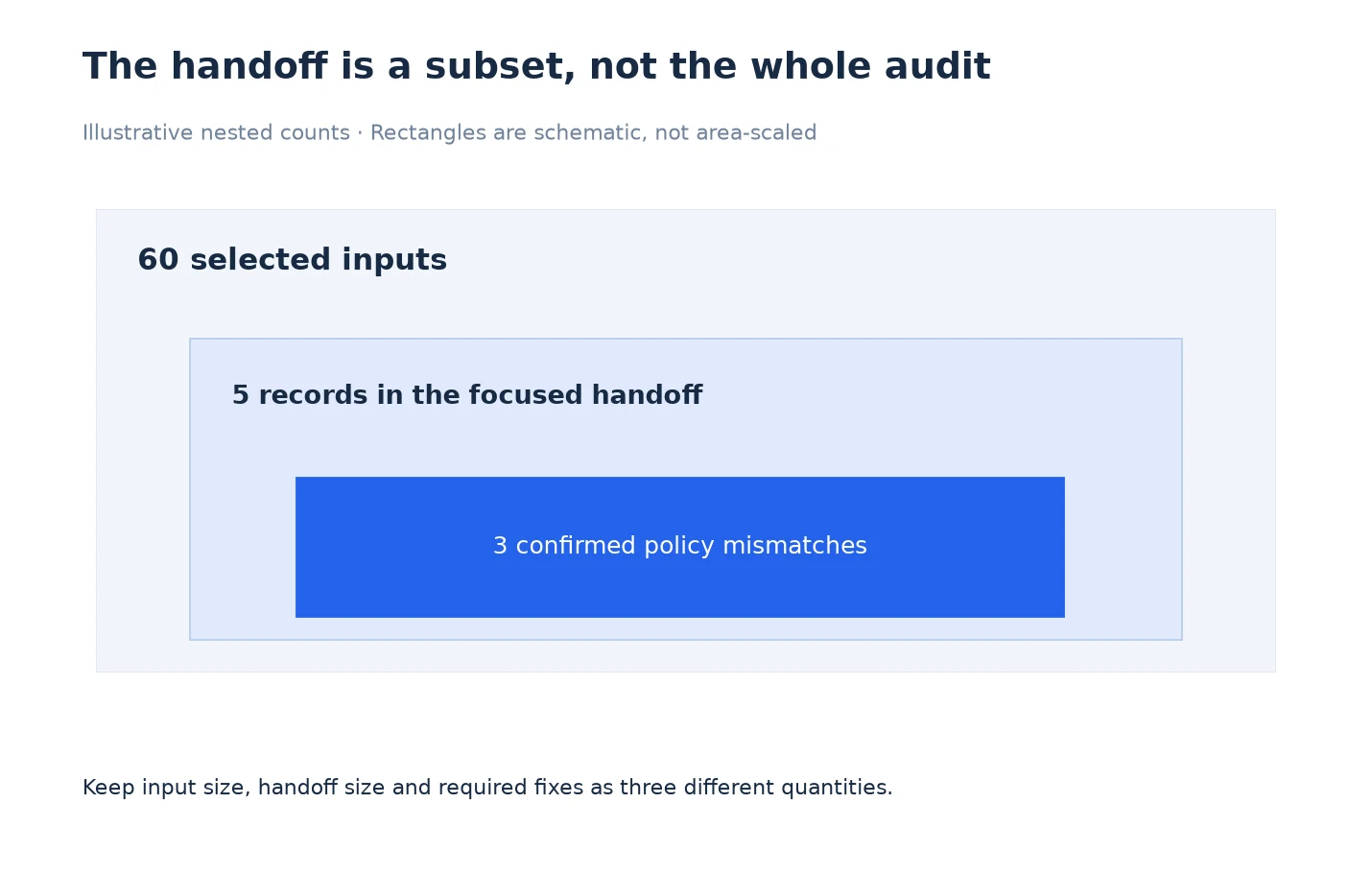
Suppose an illustrative audit reviewed 60 selected URLs and identified five records for a focused policy discussion. Three are fetched public pages with an unexpected noindex value, one is an intentionally excluded utility page, and one was not fetched because the local crawl respected a robots restriction. The categories describe this example only.
The package includes the unchanged original CSV, a five-row review worksheet, a fetched robots source copy and a short note. The worksheet marks the utility page as intentional and the blocked page’s page-level directives as unobserved. It does not turn all five rows into a claim of five confirmed defects.
The accompanying scope statement says five selected records from 60 inputs, with three confirmed policy mismatches requiring review. This preserves three different quantities: input size, handoff size and actionable findings. A nested subset diagram represents those quantities more faithfully than a chart implying that every selected record is an error.
The recipient can now inspect the three public-page values and decide whether the change belongs to a shared template. The utility exclusion remains visible as a control case. The blocked record remains useful context without pretending that its unfetched page content has been inspected. Follow reviewing robots results if a category is unclear.
Keep Evidence and Recommendations in Different Columns
Use separate fields for observed value, intended policy, interpretation, proposed action and verification status. This prevents a recommendation from being copied later as though it were an application measurement. A comment such as remove accidental noindex is an action proposal; the evidence is the recorded value on the identified response.
Avoid replacing raw values with friendly labels in the original file. Preserve capitalization, punctuation and multiple directive values as exported. If a spreadsheet reformats content during import, compare representative cells with the original CSV before sharing. The point of the export is traceability, so apparently cosmetic transformations can still matter to the investigation.
Use stable URL identifiers when linking worksheets to source files. A shortened display label is convenient, but the full URL must remain recoverable. For query-string or host-specific issues, confirm that normalization has not erased the variant needed to reproduce the case. If necessary, keep the original request identity in the manual review note.
Review the Package for Scope and Sensitive Context
Before sending the package, remove unrelated private data from the shareable copy. Internal hostnames, signed URLs or query parameters may disclose information the recipient does not need. Keep a secure original for your own investigation and explain any redaction that affects reproducibility. Do not silently alter the evidence and leave the reviewer unaware of that limitation.
Open every shared artifact once from the recipient’s perspective. Confirm that file names, timestamps and worksheet references agree. The package is ready when a reviewer can locate a finding, identify its source and understand the requested decision. Use verification of robots changes to add the eventual acceptance evidence.
Frequently Asked Questions
Does the Pages CSV include robots-related fields?
The reviewed export includes Meta Robots 1 and X-Robots-Tag 1 alongside URL, status, indexability and crawl timestamp fields. Inspect your actual output before building the handoff.
Is the CSV a complete robots simulator history?
No. Preserve the source and record the agent, path and explanation separately when those inputs are required. Do not assume a page export contains a history of local simulations.
Should I export only confirmed defects?
A focused package can also include intentional controls and unresolved observations. Label their purpose clearly so the recipient does not mistake every included row for a required fix.
Can I overwrite the original values with my recommendations?
Keep the original export unchanged. Add interpretation and proposed actions in a separate worksheet or clearly separate columns so observations remain traceable.
Which date belongs beside an exported finding?
Use the actual observation time and timezone, and separately note when the package was assembled. Export time does not make older crawl evidence fresh.
What should I do with a blocked page’s blank metadata?
Mark the page-level fields as unobserved when retrieval was prevented. Blank values in that context are not proof that no directives exist.
How much evidence is enough for a handoff?
Include enough to reproduce the specific question: URL, source, observation time, relevant settings, intended policy and the requested decision. Keep unrelated data out of the shareable package.
Sources, Statistics and Measurement Notes
CSV field names were verified in PagesExportService and source-copy behavior in RobotsTxtView on 5 October 2026. The 60-input, five-row and three-mismatch example is a constructed handoff exercise. It does not describe customer results or an automated export capability beyond the reviewed source.
For the interpretation stage, consult Google’s robots instruction reference. The file structure and review worksheet here are original operational recommendations.