
Review Crawl Scheduling Results in LLMIC
Read run states and reconcile the evidence before interpreting a delta.
A scheduled audit row can look reassuring while answering only a small part of the question. Running tells you that work began. Complete tells you something about how that run ended. Neither state, by itself, establishes that the intended website changes were checked or that the latest result is comparable with an earlier one. Review crawl scheduling results in LLMIC by connecting the schedule identity, actual observation window, completion message and saved crawl evidence. Keep a missing observation visible instead of converting it into a successful period with zero issues.
Identify the Run You Are Reviewing
Start with the exact schedule and job type. Similar hostnames, different URL paths and multiple recurring jobs can make an overview easy to misread. Confirm that the result belongs to the intended Full Audit rather than another task. Write down the actual run time and the saved result you are opening. If an operator ran a manual audit nearby, do not silently use that result as evidence that the recurring job executed correctly.
Check whether the timestamp describes a start, a finish or the most recent successful run. Those fields answer different questions. A recent attempt can coexist with an older successful observation. If the newest attempt failed, the previous complete result may still be useful historical evidence, but it does not become a fresh observation. Keep both records in view when deciding whether the recurring process is collecting evidence reliably.
Interpret States Before Comparing Numbers
Read the state together with its message. Not run means there is no completed observation to interpret from that schedule yet. Deferred describes work that is waiting. Running is an in-progress state. Partial means the retained evidence is incomplete for that run. Failed requires investigation rather than a zero-issue interpretation. Complete still needs a scope review: the scheduler is reporting an execution outcome, not certifying the website’s quality.
| State | Useful interpretation | Do not infer |
|---|---|---|
| Not run | No run result established yet | A clean website |
| Deferred | Work is waiting under reported conditions | A completed observation |
| Running | Collection is in progress | Stable final totals |
| Partial | Some evidence may be retained | Coverage equivalent to a complete run |
| Failed | The job did not establish the expected successful result | Zero issues |
| Complete | Inspect the finished evidence and scope | Every intended URL passed |
Reconcile What Was Actually Collected
Open the associated crawl and compare its observed URL set with the intended investigation. A positive page count is useful, but the count does not tell you whether the important URLs were present. Two runs can each contain forty pages while containing different pages. Record unexpected redirects, inaccessible pages, scope changes and any limits that affect coverage. If a required page was not observed, state that limitation beside the comparison rather than burying it in a general note.
Check the evidence layer and required checks as well. A run with rendering enabled may answer a different question from one that only inspects an initial response. A changed exclusion, depth boundary or input mode can alter the page population. Before interpreting a score delta, determine whether both results describe comparable work. A numerical difference across incompatible inputs can be perfectly calculated and still be a poor basis for a decision.
Read Deltas Against the Correct Baseline
The reviewed implementation can retain page and score differences against an earlier successful run for the same schedule. This is useful context, but it is not proof that the immediately preceding attempted run was the comparison. If a failed or partial attempt sits between two successful runs, identify the actual baseline before explaining the change. Preserve the baseline’s date and scope so another reviewer can reproduce your interpretation.
Treat a score as a summary of observed checks, not a business result. A higher score does not independently establish more search traffic, higher revenue or a successful deployment. Follow the change to the affected URLs and findings. When the input population changed, separate additions and removals from changes on retained pages. That produces a reviewable explanation instead of treating every movement in a dashboard number as an improvement or regression.
Worked Example: One Missing Window Changes the Story
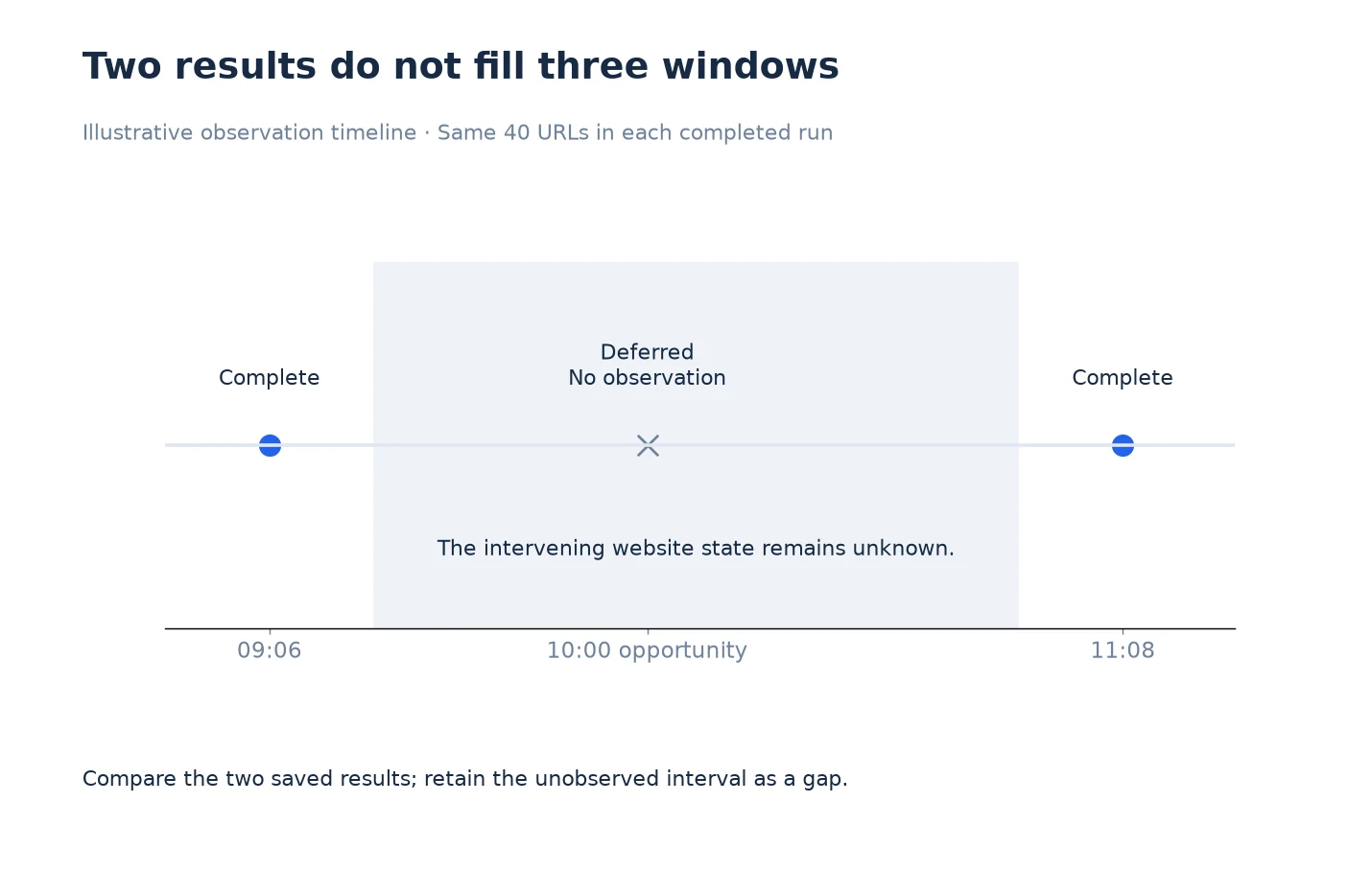
Imagine three planned observation windows in an illustrative day. The first run completes at 09:06 and covers the intended forty URLs. The next opportunity is deferred while the Mac is offline. A later run completes at 11:08 and also covers those forty URLs. There are two completed observations, not three. The gap between them contains unknown website state, even if both observed results show the same finding count.
A timeline should show the unobserved window explicitly. Do not draw an uninterrupted series that implies a 10:00 result was measured. If a deployment happened at 10:30, the 09:06 observation is before it and the 11:08 observation is after it. You can compare those two saved results if their scopes match. You cannot conclude from them that the website remained unchanged throughout the interval or identify the precise moment a finding appeared.
Turn the Review Into One Clear Next Action
Separate process problems from website problems. A deferred run may require restoring the collection environment. A confirmed broken link may require a website edit. A different URL population may require a better comparison. Assign each issue to the appropriate owner and state the evidence needed to close it. Avoid creating a content task for a page that was never successfully inspected merely because an expected result is missing.
Keep a short review record: the run reviewed, the baseline, scope differences, meaningful findings and the next action. When the evidence is incomplete, record what remains unknown and when another observation is needed. Use Export Crawl Scheduling Evidence From LLMIC for a handoff that preserves these distinctions. Use Verify Changes to Crawl Scheduling in LLMIC when the recurring process itself has been changed and needs a fresh acceptance check.
Questions About Recurring Results
Does Complete mean that my website has no errors?
No. It describes a run outcome. Open the findings and reconcile the intended scope. A complete run can contain confirmed website problems, inaccessible inputs or limitations relevant to the question being investigated.
Should a deferred window appear as zero in my report?
No. A deferred window has no completed observation to support a zero value. Label it unobserved or pending, and preserve the reason when one is available.
Can I compare two runs with the same page count?
Only after checking the actual URL sets and required checks. Equal counts can hide different pages, changed exclusions or a different evidence layer. Count equality alone is not comparable coverage.
Which earlier run does a displayed delta use?
The reviewed scheduling implementation looks for an earlier successful run of the same schedule. Confirm that record and its date; it may not be the immediately preceding attempt if that attempt failed or remained partial.
What does an older last-success time tell me?
It identifies the latest successful observation recorded for that schedule, not the newest attempt. Review later deferred, partial or failed activity separately so historical evidence is not presented as current.
Can a score increase establish that a release worked?
No. Inspect the relevant checks on the changed URLs and confirm comparable scope. A summary score does not prove the intended repair, search performance improvement or business impact.
What should I report when a result cannot be matched to a run?
State that the relationship is unverified. Keep the file and its available timestamps, but do not attribute it to a recurring job merely because its time or hostname looks similar.
Sources, Statistics and Measurement Notes
Reviewed on 5 October 2026 against ScheduledAuditStore run fields and the application audit-completion path. The examples illustrate review decisions and are not actual monitoring results. Exact baseline selection, page population and saved evidence remain part of the operator’s verification.
No published traffic, revenue or uptime benchmark is used. See review crawl scope for input reconciliation and review crawl speed for the difference between activity and useful progress.