
Configure URL Discovery in LLMIC
Choose the source that should introduce pages to the investigation.
A new article is live, but it never appears in a crawl started from the homepage. Adding its address to a URL List makes it appear immediately. Both results can be correct: the first test followed navigation, while the second supplied the destination directly.
Configure URL discovery in LLMIC by choosing which source should introduce pages to the investigation. Use linked discovery to examine a route, a sitemap to examine a declared inventory, and a URL List to inspect known addresses. Preserve those sources separately when the purpose is to find gaps between them.
Decide What “Found” Needs to Mean
Before starting, complete this sentence: “I need to know whether these pages can be found through…” The answer might be the help-center navigation, an XML sitemap, or a list exported from your CMS. That answer determines the input, and it also determines what a missing page means.
For a navigation review, supplying every destination directly would bypass the relationship you need to test. For a release check, relying only on navigation might omit a new page that has not yet been linked. Choose the test that answers the current question instead of treating all discovery sources as interchangeable.
Keep Google discovery separate from your local investigation. A page appearing in an LLMIC crawl establishes an observation under your settings. It does not show when Google first discovered it, whether Google selected it for indexing, or how it ranks.
Prepare Three Small, Named Inventories
Create a working folder for the investigation. If available, keep a list of expected public pages from the CMS, a copy of the relevant sitemap inventory, and the starting URL for the linked crawl. Give each file a date and a source label.
The CMS list is an expectation to test, not automatic proof of public availability. Drafts, private entries and removed pages can exist in a publishing system without belonging in a public crawl. Ask the content owner which records should actually be accessible.
The sitemap inventory describes what that sitemap declares. It can be incomplete or stale. Retain the sitemap URL and retrieval date so a later change does not make the original result impossible to explain. If you combine multiple sitemap inventories, retain the source for each URL in the working sheet.
Choose the LLMIC Input Mode
Use the toolbar’s mode selector to choose Auto-Crawl, URL List or Sitemap. Start with a small representative section if this is your first investigation of the website. A small test is easier to reconcile and exposes a wrong starting address before a larger run consumes time.
| Input mode | Best initial question | Evidence to preserve |
|---|---|---|
| Auto-Crawl | Can the crawler reach pages from this starting route? | Starting URL, settings and discovered result set |
| Sitemap | What happens when URLs come from this sitemap inventory? | Sitemap address, inventory date and resulting observations |
| URL List | What do these known public addresses return? | Exact supplied list and the outcome for each address |
In URL List mode, open the URL-count control, add one absolute URL per line and choose Done. Review copied lists for spreadsheet headings and partial paths. Use Import when you have a prepared file, then confirm that the supplied entries match the intended test set before pressing Play.
For Auto-Crawl, choose a seed that represents the journey you care about. A documentation hub tests a different entry point from the homepage. Keep the seed unchanged when later comparing whether a navigation repair improved discovery along that route.
Make the Boundary Explicit
Discovery and scope work together. A valid link can point to a destination beyond the depth or page limit chosen for the run. Record the relevant settings and use Configure Crawl Scope in LLMIC if you need help defining the boundary.
Do not assume that a link to another hostname will be treated like an internal page. Note cross-host destinations in the investigation plan and check their observed treatment. A marketing site and a separately hosted help center may require distinct evidence sets even when visitors experience them as one product.
Keep URL variants visible in the source inventory. Removing every query string or changing path case before the run can erase meaningful differences. If you intentionally simplify a list, save the original and document the comparison rule. A normalization decision should not silently become a claim about how the server behaves.
Account for Navigation That Depends on JavaScript
Inspect one representative navigation page before interpreting missing destinations. A link may be present in the initial HTML, appear after rendering, or require a user interaction. Record which condition applies to the route you are testing.
Google recommends ordinary anchor elements with resolvable href attributes for crawlable links. A button that changes views through script events is not the same evidence as an address exposed in a link. When investigating JavaScript navigation, compare what the page supplies with the rendering configuration used in the crawl.
Do not enable extra rendering everywhere simply because one destination is missing. First determine whether the destination is actually linked and whether rendering is relevant to that link. This keeps the diagnostic run focused and avoids attributing an input-list error to JavaScript.
Worked Example: Launch Six Tutorial Pages
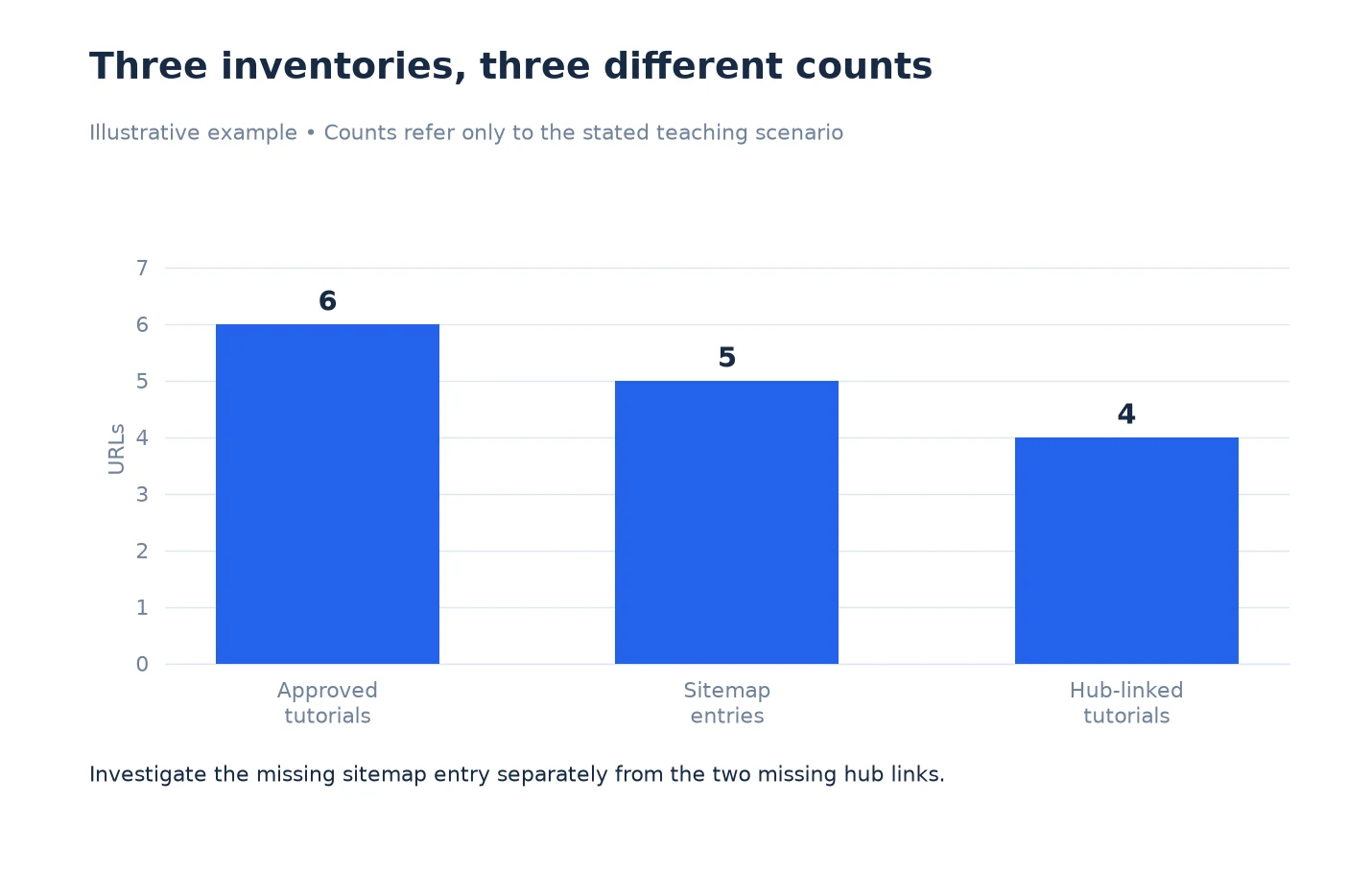
This is an illustrative publishing scenario. A team has six new tutorials. All six appear in the CMS’s approved public list, five appear in the current sitemap, and four are linked from the tutorial hub.
The team first supplies all six in URL List mode to check their direct availability. It then runs a separate linked investigation from the hub and compares the result with the six-page expectation. The sitemap inventory remains a third source rather than being merged into the linked result.
The missing sitemap entry goes to the publishing owner. The two missing hub links go to the navigation owner. A page that fails the direct check goes to the person responsible for its public delivery. These are separate defects with separate acceptance tests; one larger crawl total would not distinguish them.
Once the input choices are recorded, continue with Review URL Discovery Results in LLMIC. The important output of setup is a test whose missing URLs can be explained, not an impressive-looking page count.
Questions About Discovery Setup
Should I combine sitemap and CMS URLs before the first run?
Keep the originals separately. You may create a combined direct-check list, but preserve a source column in your working document. Otherwise you lose the ability to identify which source omitted a page.
Can URL List prove that a page is internally linked?
No. It supplies the destination directly. Use a linked investigation and inspect the relevant source page when the question is whether navigation exposes the destination.
What is a useful starting URL for a section review?
Use the public hub through which readers are expected to enter that section. Record its exact address. If multiple entry routes matter, test them separately before combining conclusions.
Does an XML sitemap contain every public page?
Not necessarily. Compare it with an approved expected inventory when completeness matters. Treat omissions and stale entries as findings to investigate rather than assuming either source is perfect.
Should I strip tracking parameters from my input file?
Only under a documented rule that fits the investigation. Preserve the original URLs, and do not remove parameters that change the resource you intend to test.
Do I need JavaScript rendering for every discovery check?
No universal setting fits every website. Inspect representative source pages and determine whether important links depend on rendering. Keep that choice with the run record so later comparisons are meaningful.
What should I record before pressing Play?
Record the reader journey, input mode, seed or list filename, inventory date and relevant scope settings. Identify expected pages and deliberate exclusions so the resulting set has a clear purpose.
Sources, Statistics and Measurement Notes
The input selector and URL List workflow were checked in LLMIC on 5 October 2026. Inventory comparison is an analyst procedure; this guide does not claim automatic access to your CMS or a complete map of all possible site URLs. The six-tutorial example is illustrative.
Google’s link best practices supports the distinction between ordinary links and script-only interactions. Google’s sitemap overview explains sitemap discovery. Both were accessed on 5 October 2026; neither guarantees an LLMIC or Google discovery outcome.