
Export Canonical Signals Evidence From LLMIC
Preserve relationships and their evidence in the handoff.
A canonical handoff should preserve a relationship, not just a warning label. The recipient needs to see which source declared which target, what was observed about that target and why the relationship is considered intentional or incorrect. A list of affected URLs without those connections forces the next reviewer to reconstruct the investigation.
This guide packages LLMIC page exports with a source-to-target worksheet and the supporting evidence that the spreadsheet cannot express alone. It keeps raw observations separate from your recommendations and identifies targets that were never collected. The result is a focused handoff that can support a specific website change or a request for more evidence.
Choose the Unit of the Export
Decide whether the recipient is reviewing source pages, unique targets or issue instances. These are different units. Several source variants can point to one target, and one source can have several findings. A file that mixes those units without labels makes counts difficult to interpret and can exaggerate the apparent change surface.
For most developer handoffs, start with one row per source-and-declared-target relationship. Add an identifier for the related issue evidence and a separate target observation where available. If multiple declarations occur on one page, use enough rows or an attached markup record to retain every target rather than keeping only the first displayed value.
Keep a copy of the full original export and create the focused worksheet separately. Record the input population and the selection rule used for the handoff. A ten-row extract from a larger audit can be useful, but it must not be represented as the full site’s canonical inventory.
Preserve the Native Page Fields
The reviewed LLMIC Pages CSV includes Address, Status Code, Indexability, Canonical Link Element 1, Redirect URL and Crawl Timestamp, along with other page fields. Retain the relevant values in the original artifact. They establish the collected source identity and the canonical value available in that export.
The single Canonical Link Element 1 field is not a complete history of all declarations or every canonicalization method. If the case involves multiple tags, preserve the relevant source markup. If it involves a response-header declaration, include the corresponding header evidence separately. Do not describe a one-column export as a complete canonical signal bundle without inspecting its actual contents.
Open the exported file and reconcile its rows with the intended selection. Confirm that the target records needed for the case are present or clearly identified as absent. A visible filter in an application is not enough to establish the exact output population; check the file that will actually be shared.
Build a Relationship Worksheet Beside the Raw Export
Use explicit columns for source URL, observed declaration, resolved target, intended target, target observation, interpretation and proposed action. Keep observation times for both source and target when they were collected separately. This prevents a recently checked target from making an older source declaration appear newly observed.
A target observation can be a saved page record, a separately collected response or unknown. State which it is. If a target was outside crawl scope, mark that coverage limitation rather than copying the source’s status into the target column. The two URLs are separate observations even when the final worksheet joins them on one line.
| Worksheet field | Purpose | Common ambiguity it removes |
|---|---|---|
| Original source URL | Reproduce the affected input | Parameter or redirect identity lost in display |
| Declared target | Preserve what the page stated | Recommendation mistaken for observation |
| Intended target | Record the owner’s policy | Existing output assumed to be correct |
| Target evidence reference | Locate the destination observation | Missing row treated as failed response |
| Observation times | Compare compatible evidence | Export time mistaken for crawl time |
| Decision and owner | Make the next step actionable | Every finding treated as the same repair |
Use reviewing canonical results when the interpretation column is not yet supported. A worksheet can legitimately contain unresolved rows; it should not manufacture certainty to make the handoff look finished.
Worked Example: Four Sources Share One Target
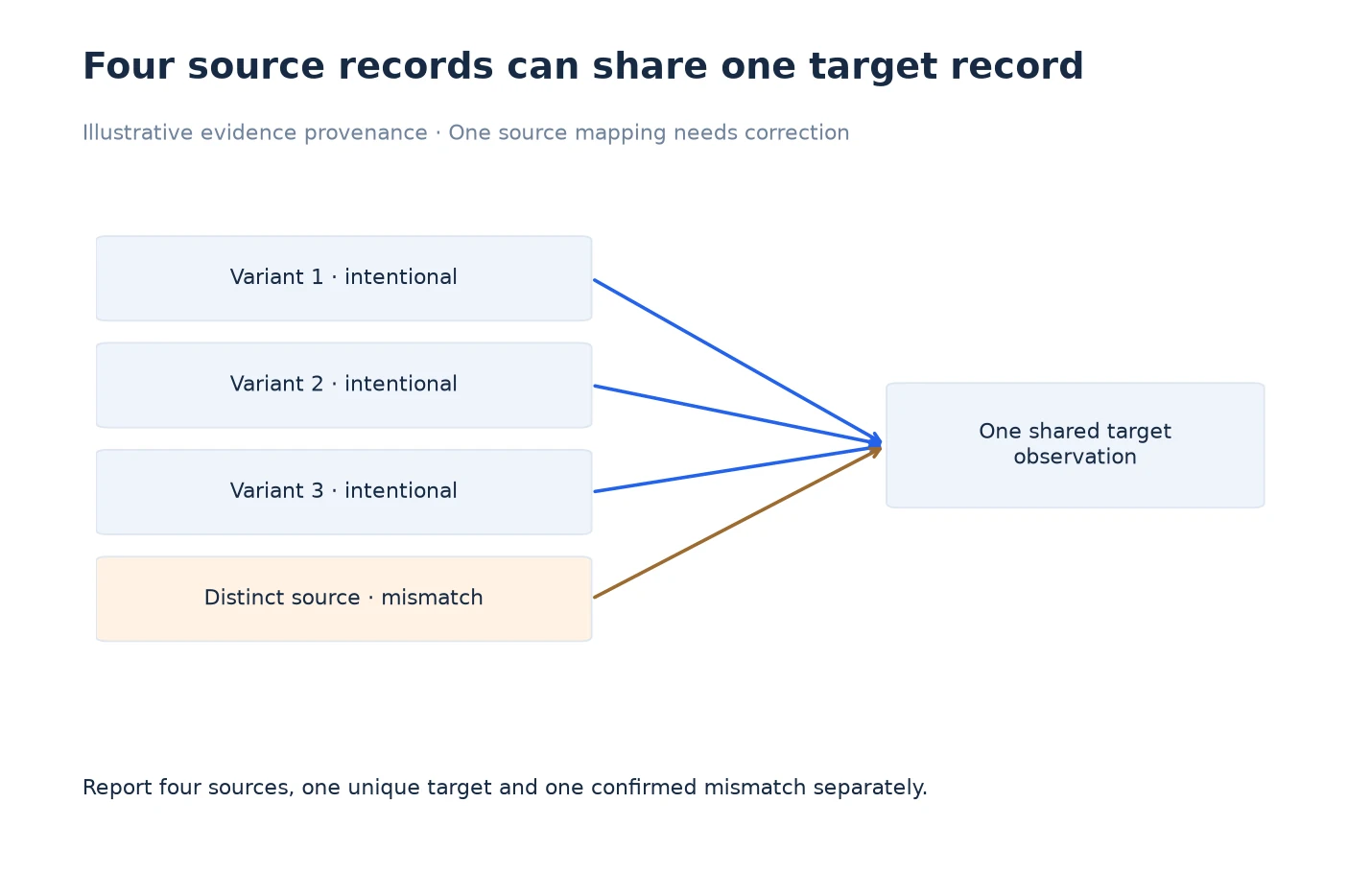
Imagine an illustrative investigation with four source variants declaring the same target. Three relationships are intentional. The fourth source serves distinct content and inherited the target from a shared template by mistake. The target itself was collected successfully and is not the defect in this example.
The handoff contains four relationship rows and one linked target-evidence record. It reports four reviewed sources, one unique target and one confirmed policy mismatch. Those quantities answer different questions. Calling this four broken canonicals would erase the owner’s intended relationships and misrepresent the scope of the required change.
The provenance diagram connects the four source records to the shared target observation, with the single mismatch called out in the review layer. The diagram is schematic: it does not depict traffic volume, ranking influence or link strength. Its purpose is to show which evidence can be reused and which source-specific decision still needs individual attention.
The developer receives the affected source’s markup, the intended replacement target and a control source that should retain the existing relationship. That gives the change a clear boundary. After deployment, both records can be checked again without re-opening the entire audit or guessing which variants were supposed to change.
Retain Markup When the Case Depends on It
For duplicate or conflicting declarations, include the smallest source excerpt that preserves the relevant elements and their context. Identify the collection method and URL. Avoid screenshots that crop away the attribute value or make two declarations appear to be a single wrapped line.
Keep raw evidence unchanged and place annotations in a separate note. If you redact private hostnames or sensitive parameters for sharing, label the redaction and explain its effect on reproducibility. The recipient should know when a value is a placeholder rather than a literal production URL.
Where an issue concerns generated output, include the observed source and the relevant rendered observation as distinct artifacts. Name them clearly. A reviewer cannot diagnose an extraction or rendering difference if both files are called page.html and their collection conditions are missing.
Make the Requested Decision Explicit
End the handoff with a short question or action tied to the evidence. For example, ask the owner to correct the distinct article’s inherited target while preserving the three intentional variant relationships. Include the expected result and the control case. This is more useful than asking someone to improve the canonical score.
If the target is unobserved, the next action may be additional collection rather than a site edit. If the source output is ambiguous, the next action may be identifying the emitting system. Assign those actions accurately so the recipient does not make an unnecessary production change just because the package contains an issue label.
Add the eventual verification record to the same package. Keep baseline and fresh files separate, retain their observation times and state the tested scope. The completed package should explain both the reason for the change and the evidence that accepted it.
Frequently Asked Questions
Which native CSV field contains the canonical declaration?
The reviewed Pages export includes Canonical Link Element 1. Inspect its actual value and retain supporting markup when the case involves more than the single exported field.
Does one exported row prove the target was checked?
No. Link to the target’s own observation or mark it unknown. A source declaration identifies a destination but does not establish that destination’s response or content.
How should I count several variants with the same target?
Report source relationships and unique targets separately. One target observation can support several rows, while each source still needs its own intent decision.
Can I replace the declared target with the recommended target?
Keep both in separate columns. Overwriting the observed value destroys the evidence needed to understand why the recommendation was made.
What should accompany a multiple-tag finding?
Include the relevant source markup with all competing declarations, the affected URL and collection context. A single canonical field may omit the conflict.
Should unresolved target rows be removed from the handoff?
Keep them if they matter to the decision and label the missing evidence. Removing them can make a partial investigation look complete.
What makes the export ready for a developer?
The recipient can identify the affected source, locate its evidence, understand the intended relationship and repeat the acceptance test without guessing the original scope.
Sources, Statistics and Measurement Notes
Native field names and export behavior were checked in PagesExportService and PagesTableViewModel on 5 October 2026. The four-source, one-target example is a constructed provenance exercise with one intentional policy correction; it is not measured customer data.
Google’s canonicalization guidance supplies the external context for canonical declarations. The worksheet and handoff structure are original recommendations for preserving local evidence.