
Review URL Discovery Results in LLMIC
Interpret discovery differences without overstating what the crawl proves.
Your sitemap lists a page that a linked crawl did not find. It is tempting to call that page an orphan and send a repair ticket immediately. But the crawl may have started from the wrong section, stopped early, or missed a navigation link that depends on rendering.
Review URL discovery results in LLMIC by comparing named URL sets and inspecting the relationships behind important differences. Use “sitemap-only in this comparison” before using a stronger label such as “orphan page.” The first phrase describes evidence; the second needs a broader investigation.
Build a Membership Sheet
Start with the approved inventory, the sitemap-derived set and the linked-crawl results relevant to your question. Put each distinct raw URL in one row and add separate membership columns. Do not begin by merging near-matching addresses into a single row.
A simple working sheet can contain URL, expected public page, present in sitemap, observed in linked crawl, direct-check outcome, source page to inspect and review decision. These are recommended analyst columns, not a promise that one LLMIC export already includes every field.
Use an explicit unknown value where the evidence is unavailable. A blank cell is ambiguous: it may mean “not found,” “not checked” or “not applicable.” Agree the labels before another person begins filtering or calculating totals from the sheet.
Read Each Group as a Different Question
| Membership pattern | What it suggests checking | What it does not establish |
|---|---|---|
| Expected, in sitemap and observed through links | Confirm the intended page and route | That every technical check passed |
| Expected and in sitemap, absent from linked results | Examine internal paths and crawl boundaries | That no internal link exists anywhere |
| Expected and linked, absent from sitemap | Review the sitemap’s intended inclusion rules | That the page cannot be discovered by search engines |
| Expected but absent from both observed sets | Check publication, direct access and source completeness | That the page has been deleted |
| Unexpected but discovered | Inspect whether the URL belongs in this investigation | That the additional URL is harmful |
The same page can deserve more than one action. A stale sitemap address may redirect correctly while a hub still links to the old path. Keep the sitemap cleanup and the internal-link repair as separate tasks so each can be verified against its own source.
Preserve Requested and Destination URLs
When a supplied or linked URL redirects, retain its original identity alongside the final destination where that destination is known. Otherwise a valid final page can hide an outdated reference in the sitemap or source link.
For example, matching only the final destination can make two different source addresses look like one successful discovery. That may be useful for a content inventory, but it loses information needed to repair the referring source. State whether your comparison concerns addresses as published or pages as ultimately reached.
Do not assume a canonical declaration is a redirect. It is a different signal. A URL that returns content and declares another canonical still has its own observed request and source relationships. Avoid rewriting the inventory as though the declaration changed the original hyperlink.
Inspect Source Pages Before Assigning Link Repairs
For an important destination missing from the linked set, identify the page that should expose it. Open that source and inspect the relevant navigation or contextual reference. Record the actual destination address and whether the link is available under the conditions used in the crawl.
If the source page was itself absent, work backward along the route. Fixing a link on a page the investigation never reached may not explain the first gap. Find the earliest missing step from the chosen seed rather than jumping directly to the final destination.
A screenshot can show where a navigation element appears, but it does not by itself establish the destination encoded in the link. Preserve the URL relationship as text in the working sheet. That gives the developer a reproducible source-and-destination pair.
Check Whether the Comparison Is Fair
Review the linked run’s seed, depth, page ceiling, finish state and rendering choices. Compare the dates of the sitemap and crawl evidence. A page published between the two observations may explain the discrepancy without a broken discovery mechanism.
Be especially careful with filtered exports. An internal-link report, a Pages subset and a sitemap inventory may have different inclusion rules. Confirm what each file contains before joining them. A missing row in a deliberately filtered file is not a missing URL from the original crawl.
If the available evidence is too narrow to establish a cause, keep the decision open. Use Troubleshoot URL Discovery in LLMIC to isolate the missing relationship with a smaller diagnostic test.
Worked Example: Review a Resource Library
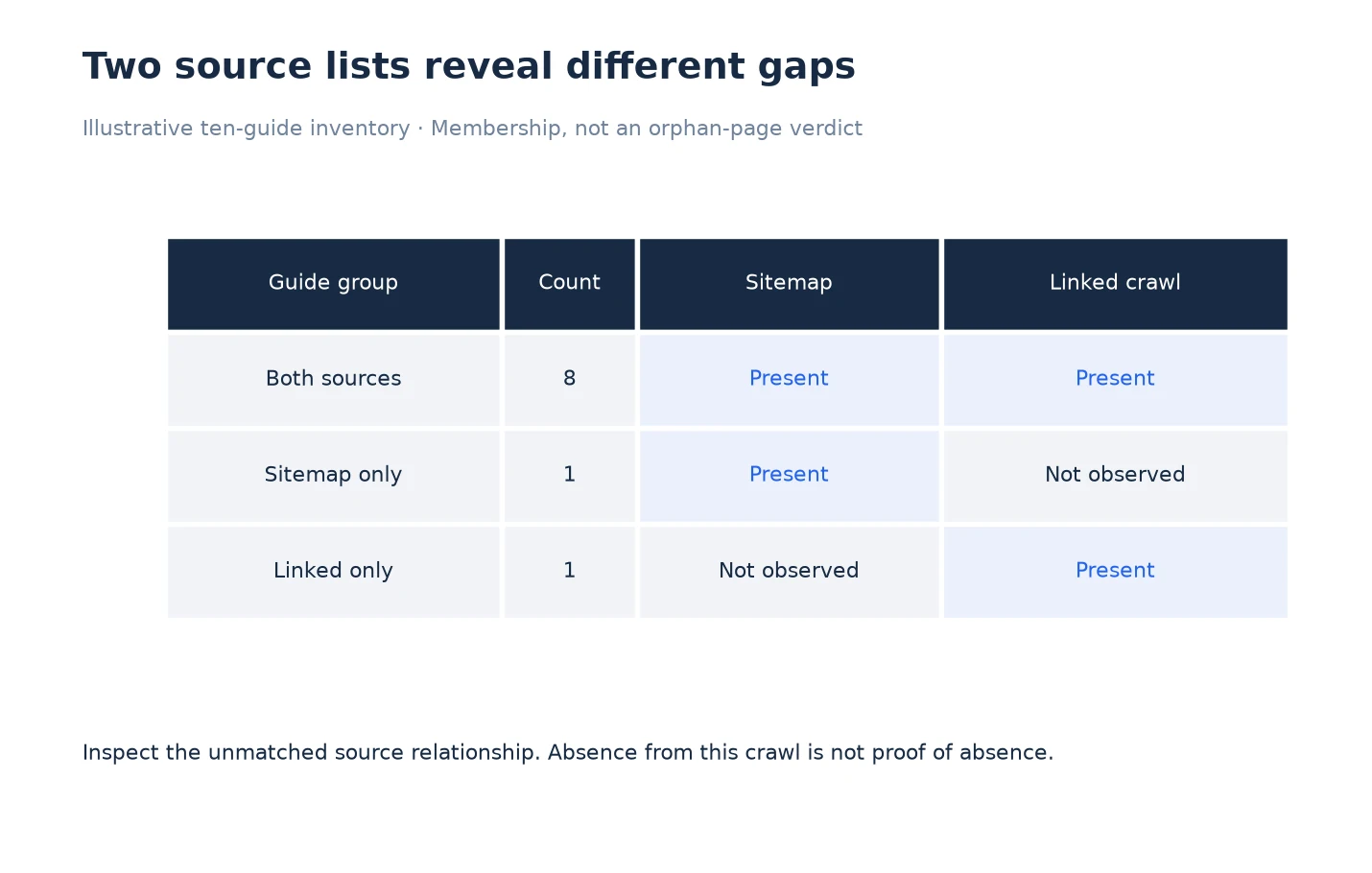
Read across each matrix row to see which source observed that group. The sitemap-only guide needs a link-path investigation; the linked-only guide needs a sitemap-inclusion decision. The matrix separates those questions without claiming that either guide is an orphan page.
This example is illustrative. A resource owner approves ten public guides. Eight appear in both the sitemap and linked results. One appears only in the sitemap comparison, and one appears only in the linked comparison.
The reviewer inspects the sitemap-only guide and finds that its topic hub was outside the selected linked crawl’s boundary. The current evidence therefore does not support an orphan-page claim. The next action is a targeted route check from the appropriate hub, with the original limitation retained in the notes.
The linked-only guide is publicly accessible and still useful. Its omission from the sitemap is sent to the publishing owner to check the generator’s inclusion rules. It is not described as undiscoverable, because the linked crawl already found it.
The final review has two unresolved source questions instead of a single alarming “two missing pages” total. This distinction prevents a developer from adding unnecessary links to one page while overlooking the actual sitemap issue on the other.
Prioritize by Reader Impact
Start with a destination that readers need for a critical task and for which the missing route is confirmed. Record the task, source page, destination and proposed action. A payment-help article hidden from the support hub may deserve attention before a low-value historical page with the same membership pattern.
Do not rank repairs solely by the number of URLs in a group. One shared navigation defect can affect many important pages, while many unusual URL variants may be irrelevant to the approved inventory. Sample the pattern, confirm the mechanism and then define the repair’s intended reach.
For the handoff, use Export URL Discovery Evidence From LLMIC. Keep evidence labels attached to the rows so the next person does not convert a tentative classification into a confirmed defect.
Questions About Discovery Review
Can I call a sitemap-only page an orphan?
Not from that comparison alone. Check whether the linked crawl covered the relevant sources and inspect internal relationships. “Sitemap-only in this run” is the accurate initial classification.
Is a linked page missing from the sitemap an emergency?
Assess the page’s intended role and the sitemap’s rules. The omission deserves review when the page should be included, but it does not erase the observed link through which the page was found.
Should I compare final destinations or original URLs?
Preserve both when redirects occur. Use original URLs to repair published references and final destinations to understand what the request reached. Explain which identity drives each count.
What does a blank membership cell mean?
It should not have to be guessed. Use explicit values such as present, absent from this source, not checked or unavailable. Document the meanings before computing summary counts.
Can different collection dates explain missing pages?
Yes. Publication or navigation may change between observations. Compare timestamps and inspect relevant changes before concluding that the difference indicates a persistent defect.
How do I choose the first source page to inspect?
Start with the source that should introduce an important missing destination. If that source was also unobserved, work backward toward the crawl’s starting point until you find the first unexplained gap.
Does discovery evidence tell me whether Google indexed a URL?
No. These sets describe the supplied inventories and local crawl observations. Review dated Search Console evidence separately when you need a statement about Google’s indexing state.
Sources, Statistics and Measurement Notes
The ten-guide comparison is a constructed example. Membership columns and review decisions are an analyst worksheet, not measured customer results or an automated orphan-page certification. LLMIC input and export boundaries were reviewed on 5 October 2026.
Google’s sitemap overview, accessed 5 October 2026, explains why sitemap inclusion is distinct from guaranteed crawling or indexing. The review method here preserves that distinction while investigating local evidence.