
Review Crawl Scope Results in LLMIC
Reconcile the intended URL set with the evidence actually recorded.
A crawl finishes with 186 pages in its results. Your sitemap contains 240 URLs. Is the crawl incomplete? The answer depends on which URLs were supplied, what the crawler could reach, and why the two sets differ. Subtracting the totals identifies a question, not its cause.
Review crawl scope results in LLMIC by reconciling the intended input with the observed URLs. Then separate successful observations, exclusions, failures and URLs for which you have no evidence. This review determines which conclusions the report can support before anyone turns its findings into an implementation plan.
Recover the Original Question First
Locate the starting URL or input list and the settings used for this run. Record whether it was Auto-Crawl, URL List or Sitemap mode. Note the time, relevant limits and whether the run completed normally or was stopped. Do not rely on current settings if someone changed them after the crawl.
If the original question was “check the pages changed in this release,” the denominator is that approved list. If the question was “follow links from the help center,” you need the seed and traversal boundaries. Neither automatically gives you a denominator for the entire domain.
When the original inputs are missing, label the review accordingly. You can inspect the recorded pages, but you cannot reconstruct an exact intended inventory from a page count alone. Preserve that limitation in the handoff instead of guessing what the operator meant.
Reconcile URLs, Not Just Totals
Create a small reconciliation table outside the app if the view you are using does not provide one. Start with one row for each intended URL. Match it to the observed requested URL and, where available, its redirect destination. Preserve both identities when a redirect occurs.
| Evidence state | What you can say | What remains to check |
|---|---|---|
| Expected URL has usable page evidence | This URL was inspected in the recorded run | Whether the specific test passed |
| Expected URL redirects | A different destination was reached or attempted | Whether that destination is intended and the chain completed |
| Expected URL has an access or request failure | The requested check did not yield usable page evidence | The cause of the failure |
| Expected URL is absent from the results | There is no matching observation in this evidence set | Input, discovery, exclusions and run boundaries |
| Unexpected URL appears | The crawl reached something outside the planned list | Whether it is a valid discovery or a scope mistake |
Do not silently merge case changes, parameters or different hostnames while reconciling. Some variations represent the same intended page; others represent different resources. Keep the raw URL and document any comparison rule you apply. A spreadsheet that strips every query string can accidentally make distinct pages look identical.
Separate a Clean Page From a Missing Observation
“No issue recorded” can mean the check passed, but it can also mean the relevant page was never inspected. Find the underlying page evidence before counting a URL as successful. A row containing a request error is not equivalent to a row with readable content and a passing check.
Likewise, an HTTP success response does not by itself prove the expected content appeared. A login form, challenge screen or error message can sometimes arrive in a successful response. Check representative page titles and content when the results look unexpectedly uniform or empty.
Use the result table’s visible filters deliberately. A filtered list is useful for investigation, but its displayed row count may not be the full evidence set. Record active filters with an exported subset, and return to an unfiltered view before stating a run-wide count.
Read Limits as Context for the Findings
A run that reaches its configured page ceiling deserves a coverage check. Determine whether the intended test set was fully observed and whether further discovery was expected. Do not infer that the site has exactly the same number of pages as the ceiling.
A shallow linked crawl may be complete for its settings while omitting deeper navigation paths. A direct URL List check may cover every supplied URL while saying nothing about whether those URLs are internally linked. These are scope limitations, not automatically application failures.
If a run was interrupted, preserve what it did observe. Mark the unfinished portion as unresolved rather than discarding valid evidence or describing the entire run as complete. A report can be useful and partial at the same time.
Worked Example: Reconcile a Forty-URL Check
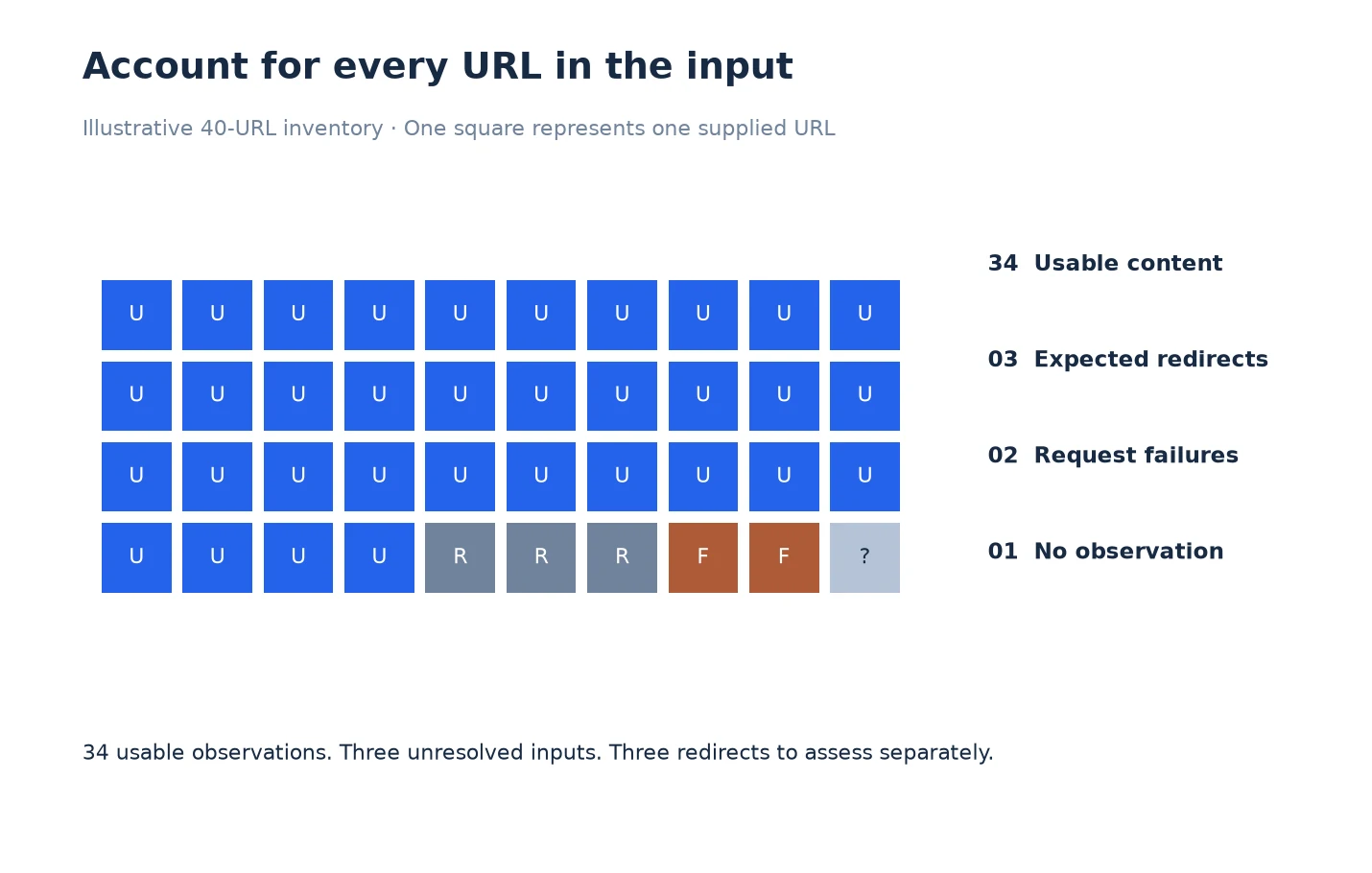
Read the unit chart as an input ledger: every square stands for one supplied URL. The 34 usable observations are only one part of the 40-URL set. Inspect the two failed requests and the unmatched input before closing the review; assess the three expected redirects against their own acceptance criteria.
The following numbers are illustrative. A team supplies forty URLs for a release check. Thirty-four have usable content observations, three redirect to intended replacement pages, two show request failures, and one has no matching result row.
The report should not say “40 pages passed.” It can say that thirty-four original pages produced usable observations and three redirects reached expected replacements, provided the destination evidence supports that statement. The two failures and one unmatched URL still require investigation. Passing a content check on a replacement also needs to be recorded separately from confirming the redirect itself.
Now suppose the table shows thirty-nine rows. That total does not explain which URL is missing, and it does not establish thirty-nine successful tests. Matching each of the forty inputs to its evidence is what makes the result actionable.
Assign the two request failures to an access or networking investigation. Inspect the unmatched URL for an input error or a scope exclusion. Send the verified redirects to the release owner for acceptance. Each group now has a clear next step instead of one ambiguous coverage percentage.
Write a Conclusion With an Explicit Boundary
A useful conclusion names the population, the observation period and unresolved gaps. For example: “We reviewed the forty supplied release URLs in this run. Three cases still lack usable evidence. The findings below apply to the recorded observations, not to unlisted pages elsewhere on the site.”
Keep that statement near the issue summary. Readers should not have to discover the limitation in a footnote after they have already interpreted a green status as a site-wide guarantee. If a denominator is unknown, report counts without inventing a percentage.
For URLs that remain unexplained, continue with Troubleshoot Crawl Scope in LLMIC. If the review is ready for another person, use Export Crawl Scope Evidence From LLMIC to preserve the context beside the data.
Questions About Interpreting Coverage
Why can the sitemap count differ from the crawl count?
The sets may contain different URLs. Redirects, duplicate inputs, access failures, discovery boundaries or an incomplete run can also contribute. Compare the actual URL sets before choosing an explanation.
Is an absent URL the same as a broken page?
No. Absence means this evidence set contains no matching observation. Check whether the URL was supplied or discoverable and whether settings or exclusions prevented processing. A broken-page claim requires evidence about the page itself.
Can I call a crawl complete when I stopped it manually?
Only describe the portion you can substantiate. A stopped run may cover a narrow test list, but it cannot be presented as a finished broader crawl merely because some results were saved.
Should redirected URLs count as successful checks?
Define the test first. An expected redirect can pass a redirect test. It does not mean the original URL returned a content page, and the destination still needs its own relevant checks.
What if I do not know the total number of site URLs?
State that the full population is unknown. Report the observed set and its boundaries. Do not calculate site-wide coverage from a guessed denominator.
Does a clean LLMIC result prove Google indexed the page?
No. A crawl observation and Google’s indexing state answer different questions. Check the relevant Search Console evidence when indexing is the question, and record its date separately.
What should I do with unexpected URLs in the results?
Keep them visible in a separate group. Check how they relate to the intended host and section, whether they are redirected destinations, and whether the investigation should include them. Do not quietly add them to a passing test count.
Sources, Statistics and Measurement Notes
This procedure uses the LLMIC input modes and result-review workflow checked on 5 October 2026. Reconciliation tables described here are analyst working documents, not a claim that LLMIC produces an automatic coverage certificate. The forty-URL example is illustrative and contains no customer measurements.
Google’s sitemap overview explains why a sitemap is a discovery aid rather than a guarantee of crawling or indexing. Accessed 5 October 2026. Use that distinction when comparing sitemap inventories with observed crawl results.