
You publish a great page.
It ranks.
And still… you don’t show up in AI answers.
Here’s why.
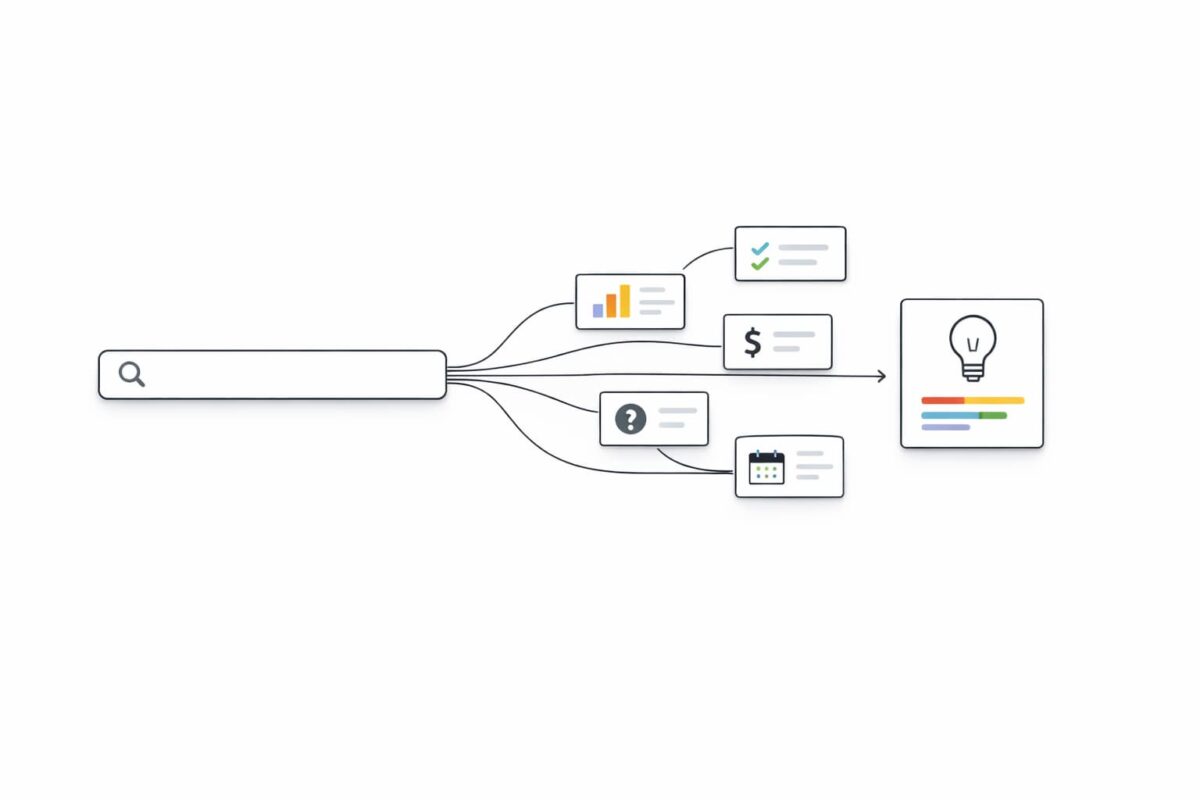
Google doesn’t just run your query.
It breaks it into many smaller queries, runs those, then builds the response.
That’s query fan out.
Key Takeaways
- What is query fan-out? One question becomes many sub-questions.
- Google query fan out: AI Mode and AI Overviews can run multiple related searches across subtopics.
- How to optimise for query fan out: cover the sub-questions with clean, “easy to quote” sections.
- Query fan out analysis: measure coverage, then fix the gaps that cost you citations.
- Query fan out tools: a generator finds sub-queries; an analyzer scores your coverage.
What Is a Query Fan Out (Query Fan Out Meaning)
Think of a search like a customer walking into a store.
They say one thing.
But they mean five things.
So the system quietly asks:
- “What does this term mean?”
- “What are the options?”
- “What are the tradeoffs?”
- “What does it cost?”
- “What’s the safest choice?”
That quiet expansion is what is query fan out.
So yes:
- what is query fan out
- what is a query fan out
- what does query fan out mean
- query fan out meaning
All point to the same idea.
One query.
Many sub-queries.
One combined answer.
Google Query Fan Out Technique (Why AI Mode Feels Different)
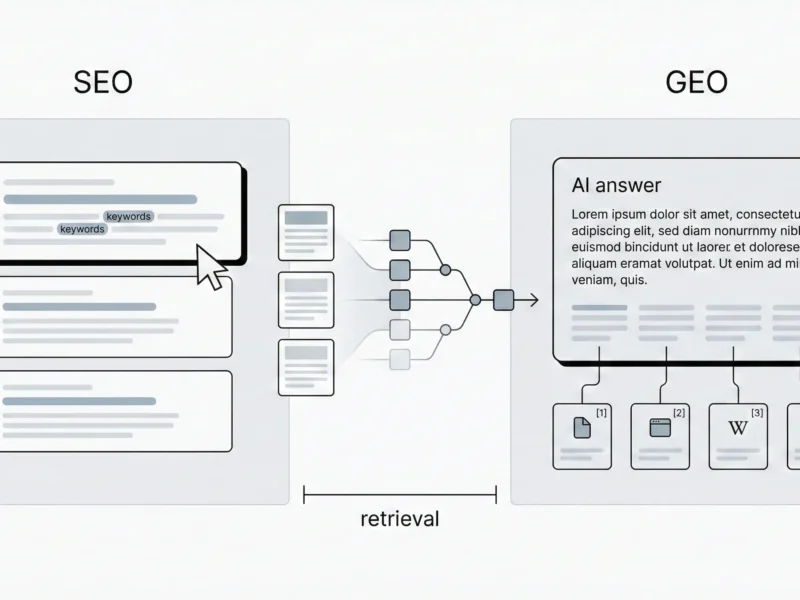
Classic Search often behaves like this:
One query → one results page.
AI Mode behaves more like a smart assistant who opens lots of tabs for you.
Same user question.
But it runs many related searches at once, then summarizes.
And for deeper research, Google has described a mode that can run hundreds of searches for one request.
That changes what “winning” looks like.
You don’t just want to “rank.”
You want to be the best source for the sub-questions.
Query Fan Out AI Mode vs AI Overviews (Same Idea, Different Moment)
AI Overviews and AI Mode can both use fan-out.
But they show up in different situations.
- AI Overviews: often appear when a quick summary helps.
- AI Mode: shows up when the question needs reasoning, comparisons, or follow-ups.
One big takeaway:
If your page only answers the headline question, you can still lose.
Because the citations can come from pages that answer the sub-questions better.
The Query Fan Out Method (How It Works in Real Life)
Here’s a clean way to picture it.
A user asks:
“Best project management tool for a small agency.”
The system may fan it out into:
- “best project management tool for agencies”
- “best for 10–20 people”
- “pricing under $X”
- “client approvals feature”
- “reporting dashboards”
- “Asana vs Trello vs ClickUp”
Then it builds the final response using sources that win each mini-battle.
That’s the query fan out method.
And it’s why “one perfect article” isn’t always enough.
How to Optimise for Query Fan Out (Simple Playbook)
This is the part you can control.
Write for Sub-Questions, Not Just Keywords
Every section should answer a real question.
Fast.
Use headings that match how people ask things:
- “What is query fan-out?”
- “How does Google query fan out work?”
- “How to optimise for query fan out?”
- “Query fan out analysis: how to measure coverage?”
Short heading.
Direct answer underneath.
Build Pages Like a Product Line
One page can’t do everything well.
So build a small set:
- One hub page (the main guide)
- A few focused pages (each one goes deep)
Then link them together like a simple map.
This helps humans.
And it helps machines pull the best piece for each sub-query.
Make Your Content Easy to Quote
AI systems love passages that are:
- specific
- tight
- structured
Do this:
- First line under a heading = the answer
- Then 3–6 bullets = proof, steps, or constraints
- Add a table when comparing options
Key insight: If your point can’t be copied cleanly, it usually won’t be cited.
Don’t Fail the Basics (This One Hurts)
You can’t get cited if you’re not eligible.
So keep it boring and correct:
- Page is indexed
- Page can show a snippet
- Content is visible as text (not trapped in images)
- Structured data matches what users can see
Query Fan Out Analysis (Measure It Like a Designer)
You don’t fix what you can’t see.
So you score it.
The 0–2 Coverage Score
Make a list of 25–60 likely sub-queries.
Then score your site for each one:
- 2 = you answer it directly (clear section or dedicated page)
- 1 = you mention it, but it’s thin
- 0 = missing
Now you have a number.
And a plan.
The “Citation Gap” Check
For the sub-queries where you’re weak, ask:
What would a good source include?
- a definition?
- a checklist?
- a comparison table?
- a clear example?
- real constraints (price, time, steps, limits)?
Then add that.
Not fluff.
Not filler.
The missing piece.
What to Publish to Win the Query Fan Out?
Use this as your content blueprint.
| Fan-Out Sub-Intent | What to Publish | What “Good” Looks Like | What Fails |
|---|---|---|---|
| Definition (what is query fan out) | 2-sentence definition + example | Simple language + concrete scenario | Abstract jargon |
| Mechanism (google query fan out) | “How it works” section | Subtopics → sub-queries → combined answer | Vague theory |
| Action (how to optimise for query fan out) | Step-by-step playbook | A repeatable method + checklist | Random tips |
| Measurement (query fan out analysis) | Scoring system | 0–2 score + gap list | “Track rankings” only |
| Enablement (query fan out tool) | Tool criteria + workflow | What outputs matter + how to use them | Tool list with no use case |
| AI specifics (query fan out ai mode) | AI Mode vs Overviews notes | When it’s used + what it tends to cite | Guesswork |
Query Fan Out Tool (Analyzer vs Generator)
Tools don’t replace thinking.
But they save time.
Query Fan Out Generator
A query fan out generator gives you the sub-queries.
Use it when:
- you’re planning a new content cluster
- you want to expand a single keyword into real questions
- you need a fast first draft of the fan-out list
We have built a Query Fan Out tool for ChatGPT and Gemini and call it Prism. You can download it from Google Chrome Web Store.
Query Fan Out Analyzer
A query fan out analyzer checks your coverage.
Use it when:
- you’re auditing an existing page
- you want to find missing subtopics
- you’re doing a refresh and need a priority list
FAQs
What is query fan out?
Query fan-out is when one search is split into multiple related sub-queries so an AI system can build a better combined answer.
How to optimise for query fan out?
Cover the sub-questions with clear headings, tight answers, proof bullets, and supporting pages linked from a hub.
What is a query fan out tool?
A query fan out tool helps you generate the sub-queries (generator) or measure your content coverage and gaps (analyzer).